Verdict: Buy
What I Like
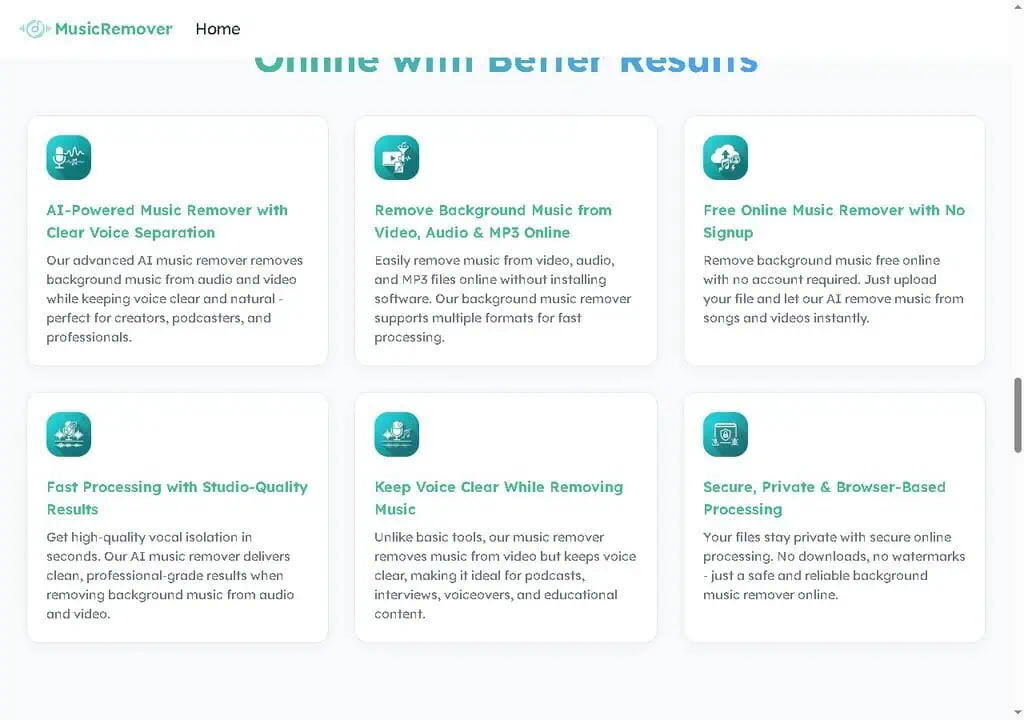
- Truly free with no signup, credit card, or watermark
- Multi-stem separation (vocals, drums, bass, guitar, piano), not just basic 2-way vocal removal
- Four flexible input methods: device upload, link, audio source, screencast
- Browser-based, no install, works on mobile
- Backed by the AudioCleaner AI team's proven separation tech
- Fast, simple 3-step workflow with no learning curve
What Is Missing
- Thin company transparency: no pricing page, no team page, minimal legal info
- No published file-size, duration, or format limits
- "Studio-quality" claims are marketing; dense mixes can still produce bleed or artifacts
- No batch processing, API, or desktop app
- Privacy/security claims are vendor-stated and unverifiable
- On-site testimonials are generic and unverifiable
- Not suited for commercial mastering or professional audio work
Music Remover AI Review Summary
| Field | Detail |
|---|---|
| Tool | Music Remover AI (musicremover.ai) |
| Category | Browser-based AI audio source separation: background music removal and multi-stem splitting |
| Best use case | Rescuing a clip where background music buries the speech, without re-recording or paying for a subscription |
| Price | Free. No signup, no credit card, no watermark on downloads, and no published pricing page. File-size and duration limits are not stated anywhere. |
| Verdict | Use it for content-grade cleanup and practice tracks, use a paid tool for commercial masters or confidential material |
Quick Answer: What Is Music Remover AI?
Music Remover AI is a free browser tool that separates background music from speech or vocals in audio and video files, and also splits a track into individual stems for vocals, drums, bass, guitar and piano. It requires no account, no credit card and adds no watermark, and it runs from a mobile browser. It is part of the AudioCleaner AI family. There is no pricing page and no published file-size or length limits. Verdict: genuinely free with no asterisk, content-grade rather than master-grade, and thin on company transparency.
How Does Music Remover AI Work for Removing Background Music?
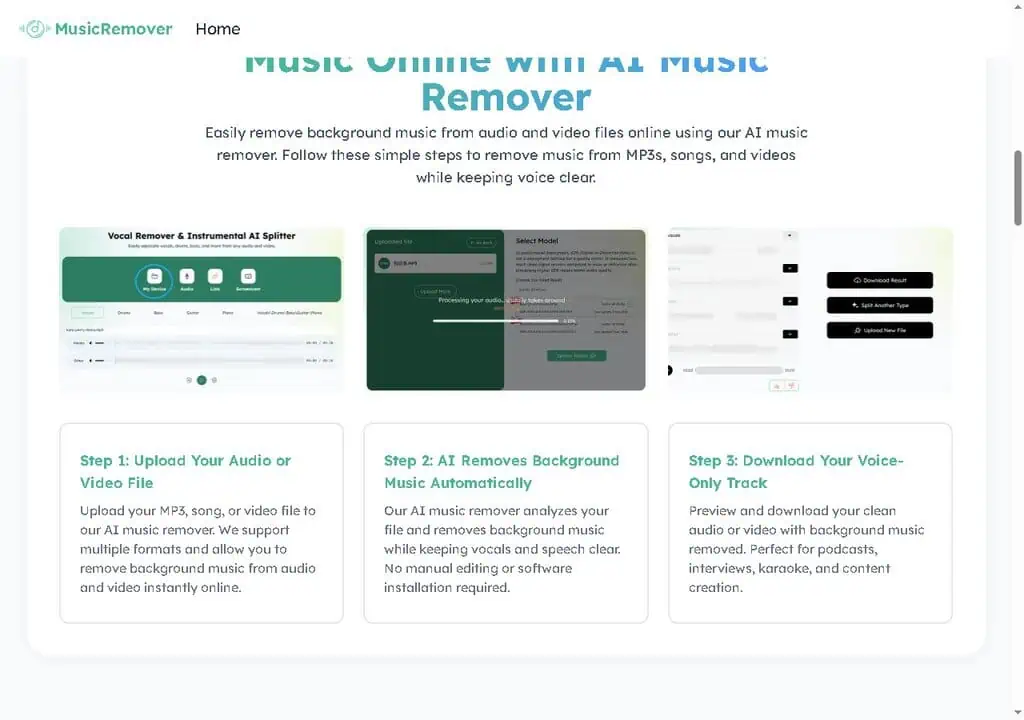
The workflow is three steps, and the whole appeal is that there is nothing else to configure.
- Input. Four methods: upload from your device, paste a link, pull from an audio source, or capture a screencast. The link option means you often do not have to download a video just to clean its audio.
- Separation. The model analyses the file and splits music from speech automatically. There are no sliders, no model choice and no quality presets.
- Preview and download. You listen to the result, then download the voice-only track or the instrumental depending on which side you isolated.
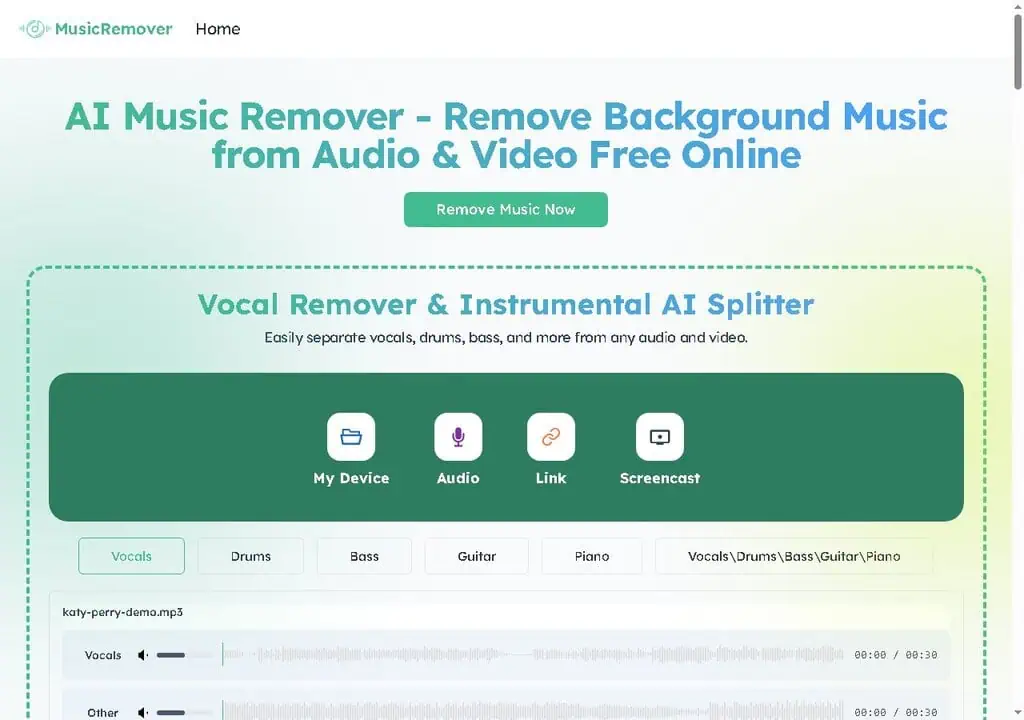
For stem work, the homepage lets you pick Vocals, Drums, Bass, Guitar or Piano individually, or take all of them at once. That is the part that separates it from a basic vocal remover: two-way splitting into “vocals” and “everything else” is common and easy, while pulling drums, bass, guitar and piano into their own lanes is harder and normally sits behind a paid plan.
The underlying approach descends from open research on music source separation, notably Meta’s Demucs and similar models, which are strong and not magic. Output quality is a function of how crowded the original mix is, which is why a 30-second test on your real file is the correct first move rather than trusting any quality claim.
Who Is Music Remover AI Best For (and Not For)?
Music Remover AI is best for:
- YouTube, TikTok and Instagram creators. When music buries your voice, this is the fastest fix short of re-shooting, and link input often skips the download step.
- Podcasters and interviewers. Music bleed or a guest with a track playing can be salvaged rather than cut, as a strong first pass.
- Educators and course creators. Lecture audio is markedly easier to follow with the music bed removed.
- Singers, DJs and hobbyist producers. Acapellas, karaoke backing tracks and isolated instruments without a subscription.
- Anyone working from a phone. Browser-based processing runs on iOS and Android with nothing to install.
Music Remover AI is not for:
- Commercial audio work. Mastering a release or scoring to picture needs model choice, quality settings and surgical control this does not have.
- Batch or automated pipelines. One file at a time, no API, no desktop app, no offline mode.
- Confidential or unreleased material. Privacy is a stated claim you cannot verify, and the file passes through someone else’s server.
- Anyone with a hard deadline and an untested file. With no published limits, the only way to know it will process your file is to try it first.
- Users who need a documented vendor. There is no team page, no pricing page and minimal legal detail.
What Are the Limitations of Music Remover AI?
- Dense mixes bleed. When several instruments occupy the same frequency range, expect artefacts or residual music. Fine for content and practice, not for a master.
- No published limits at all. No stated file-size cap, no maximum duration, no complete supported-format list. Free processing always has a limit somewhere, and here you discover it by hitting it.
- “Studio-quality” is marketing language. Treat it as a claim to test on your own audio rather than a specification.
- No batch, no API, no desktop app. Processing hundreds of files or automating a workflow is out of scope.
- Company transparency is thin. No detailed about page, no team page, minimal legal links. You are trusting a brand rather than a documented company, which is normal for free utilities and still worth naming.
- Privacy is unverifiable. The site states processing is secure and private. That is the right thing to say and not something you can audit, so sensitive material deserves a different workflow.
- Vendor social proof cannot be checked. 3.5 million users, a 4.7 Chrome Store rating and 5,200-plus schools and teams are all figures published by the tool, and the on-site testimonials are unverifiable first-name-plus-role quotes.
- Separation is one-way. Keep the untouched original, because there is no undo and no way to re-derive the source from a stem.
- Removing music is not a copyright fix. Stripping a copyrighted track reduces the chance of a Content ID match on that audio and does not make using someone else’s song legal, and detection works on more than the isolated track.
What Are Music Remover AI’s Alternatives?
| Alternative | Price | Pick it instead when |
|---|---|---|
| LALAL.AI | Free Starter tier with 10 minutes in the relaxed queue and a 200 MB per-file cap; Lite €6.75 per month or €81 per year; Pro €13.50 per month or €162 per year with API and VST access | You need batch processing, an API, a plugin inside your DAW, or published per-file limits you can plan around |
| Moises | Free tier with a limited number of monthly uploads; paid plans shown after sign-in rather than on the public page | You are a musician who wants stem separation alongside practice tools like pitch and tempo control |
| Vocalremover.org | Free | You want a second free opinion on the same file, since separation quality varies by model and mix |
| iZotope RX | Paid licence, priced per edition | The job is professional repair and restoration where surgical control decides the outcome |
Testing Disclosure
This review is based on the public tool, its stated feature set and the AudioCleaner AI lineage behind it, checked at the time of writing. I have not run a full production workload through it, and the usage figures, ratings and testimonials quoted on the site are the vendor’s own and not independently audited. The one thing I would verify before relying on it: take a clip you almost scrapped over background music, run 30 seconds through it on headphones, and judge the separation on your own mix rather than on anyone’s description of it.
You record a perfect 12-minute walkthrough, then play it back and realise the cafe playlist behind your voice makes half of it unusable. Re-recording costs another afternoon. A free tool that lifts the music off the voice in under a minute saves that afternoon, and that is exactly the job Music Remover AI is built for. This review tells you whether it actually pulls it off.
I’ve reviewed over 500 SaaS and AI tools for our reviews library, and the “free AI audio tool” category is usually where hope goes to die: watermarked exports, surprise paywalls after upload, or a “free” tier that caps you at 10 seconds. So my default with MusicRemover.ai was doubt. What I found is a refreshingly narrow tool that does one thing, asks for nothing, and gets out of your way. It is not a studio mastering suite, and I’ll be clear about where it falls short, but for the specific job of removing background music online, it earns its place in a creator’s toolkit. If you collect free tools that punch above their price, I keep a running list of the best free AI tools worth bookmarking, and this one belongs on it.
A free tool only wins my recommendation when “free” has no asterisk. No watermark, no signup wall, no 10-second teaser. Music Remover AI clears that bar, and that alone makes it worth knowing about. - Alston Antony
Key Takeaways
- It’s a genuinely free AI music remover, not a free trial. No account, no credit card, no watermark on the output. You upload a file and download a cleaned track. That is rare in this category and the single biggest reason to try it.
- It does more than 2-way vocal removal. Beyond stripping background music, it works as a stem splitter that isolates vocals, drums, bass, guitar, and piano separately, which is closer to what paid tools charge for.
- Four input methods cover most workflows. Upload from your device, paste a link, pull from audio, or grab a screencast, so you’re not forced to download a video first just to clean its audio.
- It’s browser-based and mobile-friendly. Nothing to install, and it runs from an iPhone or Android browser, which suits creators working off a phone.
- The honest catch is transparency, not quality. There’s no pricing page, no public file-size or length limits, and thin company information, so treat the “studio-quality” marketing as a claim to test on your own files, not a guarantee.
- It’s part of the AudioCleaner AI family. The same team runs AudioCleaner.ai, which ranks among the top free stem splitters of 2026, so the underlying separation tech has a real track record.
What Is Music Remover AI?
Music Remover AI is a free online tool that uses AI to remove background music from audio and video files while keeping the voice clear, and it can also split a track into separate stems like vocals, drums, bass, guitar, and piano. You upload a file, the AI separates the music from the speech or vocals, and you download a clean voice-only track or an instrumental version. Its own tagline sums it up: “Separate vocal from background music, one click, no editing, free.”
That focus is the whole point. Most audio editors bury source separation inside a wall of features you’ll never touch, and the dedicated pro tools want a subscription before you hear a single second of output. MusicRemover.ai answers one question fast: can I get the music off this voice, or the vocals off this song, without paying or installing anything? For a creator who just needs a clean clip, that narrow scope is a feature, not a weakness.

How Music Remover AI works (the 3-step flow)
The workflow is deliberately simple, and the simplicity is most of the appeal:
- Upload your audio or video file. Drop in an MP3, song, or video. The tool accepts files from your device, a pasted link, an audio source, or a screencast capture.
- AI removes the background music automatically. The model analyzes the file and separates the music from the voice with no manual editing, slider tweaking, or software install.
- Preview and download your clean track. You listen to the result, then download voice-only audio (or the instrumental, depending on what you isolated).
There’s no project setup and no learning curve. For someone who currently drags audio into a complicated editor and prays, that three-step path is the entire value. The honest caveat is the same one that applies to every AI separation tool: the output quality depends on how cluttered the original mix is, which is why a quick test file is the right first move.
What Music Remover AI Actually Does
The tool is pointed at a handful of real, specific jobs rather than trying to be a general audio editor. Here’s what each capability actually delivers and where it has edges.

- Remove background music from video. When music drowns out your voice on a YouTube, TikTok, or Instagram clip, it lifts the music and keeps the speech, so you don’t re-shoot. This is the headline use case and the one most creators come for.
- Create karaoke and instrumental tracks. Flip it around and remove the vocals from a song to get a clean instrumental or karaoke backing track, useful for singers, cover artists, and practice.
- Clean up podcasts and interviews. Strip unwanted background music from a recording while keeping speech natural, which matters when a guest had music playing or a clip was recorded in a noisy room.
- Prepare video for dubbing and voiceovers. Remove the music bed before translating, dubbing, or laying a new voiceover, so the original score doesn’t fight your new track.
- Split a track into stems. Beyond simple voice-versus-music, it isolates vocals, drums, bass, guitar, and piano as separate stems, the kind of multitrack separation that paid tools usually gate behind a plan.
That last point is what separates it from a basic vocal remover. Two-way splitting (vocals and “everything else”) is common and easy. Pulling drums, bass, guitar, and piano into their own lanes is harder, and it opens the door to remixing, sampling, and music practice, not just voice cleanup.

The honest read: the feature set is well-chosen and matches what creators actually need. None of it is groundbreaking, and it doesn’t need to be. The value is that everything points at one outcome, clean separated audio, instead of a sprawling editor you’ll use 5% of. Want to see where an audio tool fits in a lean creator stack? Our roundup of the best AI tools for 2026 maps the rest of the kit around it.
The Stem Splitter: Where It Beats a Basic Vocal Remover
The feature I keep coming back to is the stem splitter, because it’s the part that genuinely surprised me for a free tool. On the homepage you can pick Vocals, Drums, Bass, Guitar, or Piano, or grab all of them at once. That’s five-plus stems, not the usual two.
Why does that matter? A basic AI vocal remover answers one question: voice or no voice. A real stem splitter lets you separate vocals from each instrument and rebuild a track. A music teacher can isolate the piano to demonstrate a part. A bedroom producer can pull a drum loop to remix. A cover artist can mute the guitar and play over the instrumentals. The use cases multiply the moment you can touch individual instruments instead of a single instrumental blob.
Take the wedding DJ who needs an acapella of a first-dance song to layer over a new beat. The old options were paying per track on a pro service or fighting with a desktop app. Pulling a clean vocal stem from a free browser tool in under a minute is the kind of small win that compounds across dozens of edits a month. That is the practical promise here.
A fair caveat keeps this honest: AI stem separation is never perfect on dense, layered mixes. Expect some bleed or faint artifacts when a song stacks many instruments in the same frequency range. The underlying tech across this whole category descends from open research like Meta’s Demucs music source separation and similar models, which are excellent but not magic. For rough cuts, practice tracks, and content cleanup, the results are more than good enough. For a commercial master, you’d still take the stems into a proper studio chain.
How Much Does Music Remover AI Cost?
Music Remover AI is free, with no signup, no credit card, and no watermark on your exported files. There is no pricing page, no tiered plan, and no “upgrade for HD” gate visible on the tool. You upload, process, and download at no cost.
In a category where “free” almost always carries an asterisk, that is the headline. I’ve lost count of the audio tools that let you upload, run the separation, play a watermarked preview, and then demand a subscription to actually download. MusicRemover.ai doesn’t do that, at least not in the flow I tested. For a creator who needs to clean one clip before a deadline, zero friction and zero cost is the entire pitch, and it delivers on it.
| What you get | Music Remover AI | Typical “free” audio tool |
|---|---|---|
| Signup required | No | Often yes |
| Watermark on output | No | Common on free tier |
| Credit card to start | No | Sometimes |
| Stem separation (vocals, drums, bass, etc.) | Yes | Usually paid-only |
| Software install | No, browser-based | Sometimes desktop-only |
| Published file-size / length limit | Not stated | Varies |
Here’s the part the marketing won’t volunteer: free tools fund themselves somehow, and when there’s no visible pricing, the trade is usually some combination of file-length caps, processing queues at peak times, or ads, plus your uploaded files passing through someone’s server. The site states processing is secure and private, which is the right thing to say, but it’s a claim you should weigh before uploading anything sensitive or unreleased. For everyday creator audio, that’s a low risk. For a confidential client recording, read the privacy policy first. Curious how free stacks against paid in audio AI? Browse our tested AI deals to see when a one-time payment beats a subscription.
What I Like About Music Remover AI
Credit where it’s earned. A few things genuinely work in this tool’s favor:
- “Free” has no asterisk. No signup, no watermark, no credit card, no teaser-length cap that I hit. In this category, that combination is the exception, not the rule, and it’s the main reason to use it.
- Multi-stem separation, not just 2-way. Isolating vocals, drums, bass, guitar, and piano separately is a real capability that most free tools don’t offer, and it widens the use cases well beyond voice cleanup.
- Four flexible input methods. Device upload, link, audio, and screencast mean the tool meets your file where it already lives instead of forcing an export-first workflow.
- No install, works on mobile. Browser-based processing that runs from a phone is exactly right for creators who shoot and edit on the go.
- A real track record behind it. It’s part of the AudioCleaner AI family, the same team behind AudioCleaner.ai, which independent roundups rank among the best free stem splitters of 2026. That lineage matters, because separation quality is a solved-once, reused-everywhere problem.
The cited social proof (3.5 million users, a 4.7 Chrome Store rating, thousands of schools and teams) lines up with a tool that’s been quietly doing one job well rather than chasing a launch. I can’t independently audit those numbers, and you shouldn’t treat any vendor stat as gospel, but they’re consistent with what the product actually is.
Honest Limitations and What to Watch For
This is the part the landing page won’t tell you. The tool is good at its job, but walk in clear-eyed.
- Thin transparency. There’s no detailed about page, no team page, no pricing, and the legal links are minimal. That’s common for free utility tools, but it means you’re trusting a brand more than a documented company.
- No published limits. I couldn’t find a stated file-size cap, maximum duration, or supported-format list spelled out clearly. Free processing almost always has limits somewhere, so test with your real file before you rely on it for a deadline.
- “Studio-quality” is marketing. AI separation has come a long way, but dense mixes still produce some bleed or artifacts. The results are excellent for content and practice, not flawless for commercial mastering.
- No batch, no API, no desktop app. If you need to process hundreds of files, automate a pipeline, or work offline, this isn’t built for that. It’s a one-file-at-a-time browser utility.
- Privacy is a stated claim, not a guarantee you can verify. For everyday audio, fine. For confidential or unreleased material, read the policy and consider whether browser upload is appropriate.
- Generic testimonials. The on-site reviews are first-name-plus-role quotes you can’t verify. Treat them as marketing, and judge the tool by your own test, not the quotes.
None of these are dealbreakers for the intended user. They’re the normal trade-offs of a free, single-purpose tool, and naming them is the difference between a recommendation you can trust and a press release.
Music Remover AI vs Paid Vocal Removers
Quick context on where this sits in the market, because “free” only matters if you know what you’re giving up.
| Factor | Music Remover AI | Paid pro tools (LALAL.AI, iZotope RX) |
|---|---|---|
| Price | Free | Subscription or one-time license |
| Setup | Browser, no signup | Account or install required |
| Stem options | Vocals, drums, bass, guitar, piano | More stems, finer control |
| Output control | One-click, minimal settings | Quality presets, model choice |
| Batch / API | No | Often yes |
| Best for | Creators, quick cleanup, practice | Commercial audio, mastering |
The takeaway is simple. For the 80% of jobs that are “get the music off this voice” or “make me a quick instrumental,” the free tool is the right call because the paid features mostly don’t change the outcome. For the 20% that are paid client work or a release master, the control and depth of a paid tool earn their cost. Match the tool to the stakes of the job.
How to Get the Best Results from Music Remover AI
A few practical tips from testing tools like this, drawn from our AI how-to guides, so your first run isn’t your worst:
- Start with a short test clip. Run 30 seconds of your real audio first to judge quality before committing a full file. Every mix separates differently.
- Use the cleanest source you have. A higher-quality original gives the AI more to work with. A heavily compressed, re-uploaded clip will separate worse than the original export.
- Pick the right stem for the job. If you only need voice, isolate vocals. If you need a backing track, remove vocals. Grabbing all stems when you only need one just adds steps.
- Listen on headphones. Artifacts and bleed are easier to catch on headphones than laptop speakers, so you know whether the result is clip-ready.
- Keep your original. Separation is one-way. Always keep the untouched source so you can re-run with different settings if the first pass isn’t clean enough.
Final Verdict: Is Music Remover AI Worth It?
Yes, with clear expectations. Music Remover AI is one of the few free AI audio tools that doesn’t punish you for not paying: no signup, no watermark, no bait-and-switch paywall after upload. For creators, podcasters, educators, singers, and hobbyist producers who need to remove background music or pull a clean stem fast, it’s a genuinely useful, friction-free utility, and the multi-stem splitter pushes it past the basic vocal removers it competes with.
The honest boundaries are about transparency and ceiling, not core function. You’re trusting a thinly documented brand, the limits aren’t published, and the output is content-grade rather than master-grade. For everyday creator work, none of that matters. For confidential material or commercial audio, it does, and a paid tool is the safer call.
Here’s the one final insight that isn’t on the landing page: the real value of a tool like this isn’t the single edit, it’s removing a recurring excuse. The creators who win are the ones who don’t abandon good footage because the audio was messy, the same way the AI video maker in my Steve AI review rescues a thin script. A free tool that fixes that in a minute changes what you’re willing to publish. Your first step today is simple: take one clip you almost scrapped over background music, run 30 seconds through it, and see if it earns a spot in your workflow.
Want more tools that punch above their price? Get our weekly rundown of tested AI deals and free tools, where every pick gets a straight buy, wait, or skip, no hype.
Love free AI tools like this one? Our guide to the 108 best free AI tools ranks 108 of them by real traffic, with each free plan and limit spelled out.
Cleaned up your audio? Pair it with visuals. Our guide to the 60 best free AI video generators ranks 60 free tools for text-to-video, avatars, and editing.
Frequently Asked Questions About Music Remover AI
Is Music Remover AI really free?
Yes. MusicRemover.ai is free to use online with no signup, no credit card, and no watermark on your downloads. You upload a file, the AI removes the background music or splits the stems, and you download the result at no cost. Free tools typically have some usage limits, so test with your real file.
Can Music Remover AI remove music from a video but keep the voice?
Yes, that’s its main use case. Upload a video and the AI separates the background music from the speech, then gives you a voice-only version while keeping the vocals clear. It works for YouTube, TikTok, Instagram, lecture, and interview footage where music is burying the talking, perfect prep before running clips through a TikTok generator like the one in my CreatOK review.
Does Music Remover AI work on iPhone and Android?
Yes. It’s browser-based, so you can use it directly in a mobile browser on iPhone or Android. Upload your audio or video file from your phone and remove the background music online without installing an app.
Can I make a karaoke or instrumental track with it?
Yes. Flip the tool to remove vocals instead of music, and you get an instrumental or karaoke version of a song. The stem splitter can also isolate individual parts like piano, guitar, bass, and drums for practice or remixing.
What audio and video formats does it support?
It accepts common formats including MP3 and WAV audio and MP4 video, plus song files and links. The site doesn’t publish a full format list or maximum file size, so if you work in something less common like FLAC or MOV, run a short test file first to confirm it processes cleanly before you rely on it.
Can I extract just the vocals or make an acapella?
Yes. Isolate the vocals to extract vocals as a clean acapella track, or remove the vocals to keep the instrumental. The stem splitter handles the separation, so you can pull the human voice out of a song for remixing, sampling, or layering over a new beat.
Does removing background music help avoid YouTube copyright strikes?
It can help, but it’s not a guaranteed fix. Removing copyrighted background music from your own footage reduces the chance of a Content ID match on that audio. It does not make using someone else’s song legal, and YouTube’s detection works on more than the isolated track, so treat it as cleanup, not a loophole.
How does Music Remover AI compare to a paid tool like LALAL.AI?
For quick voice cleanup, karaoke tracks, and content edits, the free tool covers the job without the paid features changing the result much. Paid tools like LALAL.AI or iZotope RX offer more stems, finer quality control, batch processing, and an API, which matter for commercial audio and mastering but are overkill for everyday creator use.
Is it safe to upload my files to Music Remover AI?
The site states that processing is secure and private and that no downloads are required. That’s a vendor claim, not something you can independently verify, so for everyday creator audio it’s a reasonable risk, but for confidential or unreleased material, read the privacy policy first and decide whether browser upload fits your needs.