

Verdict: Buy
Last month, I accidentally wiped a 64GB SD card that had two weeks of product screenshots on it. The photos were gone, the Recycle Bin was empty, and Windows acted like those files never existed. I needed a recovery tool fast, and I did not want to spend $70 a month on EaseUS just to get my screenshots back.
That is how I ended up testing RecoveryFox AI, the newest product from WonderFox Soft, a company I have known since their DVD Ripper days back in 2010. They claim a 98% recovery rate powered by AI scanning.
Most data recovery tools make similar promises. I wanted to see if this one could actually deliver on a real drive with real deleted files, not some controlled demo environment.
For context, I have reviewed over 500 SaaS tools across AI, SEO, and productivity categories on zplatform.ai.
When a tool falls short, I say so. When it works, I show you exactly what I saw on my screen. This review is no different.
By the end of this RecoveryFox AI review, you will know exactly how the AI scan performs, what file types it handles well (and which ones gave it trouble), how the pricing compares to EaseUS, Disk Drill, and Recuva, and whether it deserves a spot in your toolkit. If you have been searching for the best data recovery software that does not drain your wallet, keep reading.
What is RecoveryFox AI?
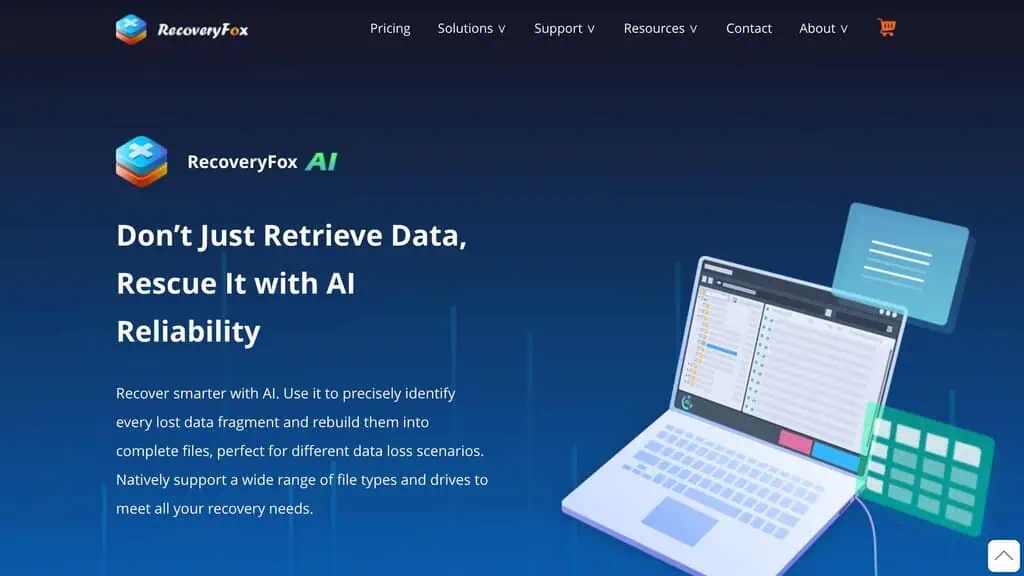
RecoveryFox AI is a Windows data recovery software built by WonderFox Soft that uses artificial intelligence to scan storage devices and recover deleted, formatted, or corrupted files. If you have been searching for WonderFox data recovery tools, this is their flagship AI data recovery product.
The “AI” part is not just marketing. The software uses pattern recognition to identify file fragments scattered across a drive and rebuild them into complete files, even when the file system no longer has a record of them.
WonderFox Soft launched in 2009 and has shipped products to over 10 million users across 180 countries. Their lineup includes HD Video Converter Factory, DVD Ripper, and several free tools. RecoveryFox AI is their entry into the data recovery market, and it is clear they built it on top of years of experience working with file formats, codecs, and storage structures.
The tool supports over 500 file formats across three file systems: NTFS, exFAT, and FAT32. It works on internal hard drives, SSDs, USB flash drives, SD cards, TF cards, cameras, and external drives of any capacity.
What caught my attention was the free scan-and-preview model. You can scan any drive and preview recoverable files without paying a cent.
The purchase only becomes necessary when you actually want to recover files to a new location. That approach shows confidence, because it means you can verify the tool works before spending money.
If you are exploring tested AI deals across different software categories, RecoveryFox AI fits squarely in the utility tools space where AI genuinely adds functional value rather than being a buzzword.
How does RecoveryFox AI work?
The recovery process follows three steps, and the interface makes each one obvious even if you have never used file recovery software before.
Step 1: Select the location
Launch RecoveryFox AI and you see every connected drive and partition listed on the main screen. Internal drives, external USB drives, SD cards, everything shows up automatically. You can also target the Desktop, Recycle Bin, or a specific folder if you know approximately where the lost files were.
I plugged in my 64GB SD card and it appeared within two seconds. No driver installation, no configuration. Just select the drive and move on.
Step 2: Start the scan
Clicking “Start Scan” triggers a Quick Scan first, which checks file system records for recently deleted entries. This finishes fast, often in under a minute for smaller drives. The software then automatically transitions into AI Scan mode, which goes deeper.
The AI Scan reads raw data from the drive surface and uses pattern matching to identify file signatures. This is where it finds files that were deleted weeks or months ago, files from formatted drives, and fragments of files whose directory entries were overwritten.
One detail I appreciated: you can pause the scan at any point and resume later. If you spot the file you need during the Quick Scan phase, you can stop there and recover immediately without waiting for the full AI Scan to finish.
Step 3: Preview and recover
After scanning, RecoveryFox AI presents results organized by file type. You can filter by format, date, size, or search by filename keywords. The preview function lets you open photos, play video clips, and view document contents directly inside the app.
The Quick Scan found nothing since the card had been formatted. But the AI Scan recovered 847 out of 892 photos, including RAW files. She was back in business within an hour.
Select the files you want, choose a recovery destination (always a different drive from the source), and click Recover. The files appeared in my target folder with their original names and folder structure intact.
What RecoveryFox AI does besides the AI Scan
500+ file format support
The format coverage is comprehensive. Documents (DOCX, XLSX, PPTX, PDF), images (JPEG, PNG, RAW, CR3, TIFF), videos (MP4, AVI, MOV, MKV), audio (MP3, WAV, FLAC), compressed files (ZIP, RAR, 7Z), and even database files and executables.
I did not test all 500 formats, but the common ones I needed (JPEG, PNG, MP4, DOCX, PDF) recovered cleanly with full file integrity.
Partition recovery
If a drive partition becomes inaccessible or disappears after a disk error, RecoveryFox AI can scan the unallocated space and recover files from the lost partition. This is a feature you hope to never need, but when you do, it justifies the purchase by itself.
Original file structure restoration
Recovered files maintain their original folder hierarchy, filenames, and metadata. This matters more than people realize.
Other tools dump everything into a flat folder with generic names like “Recovered_001. jpg,” making it a nightmare to sort through thousands of files. RecoveryFox AI preserves the original structure, saving hours of manual organization.
Smart filtering and search
After a deep scan, you might be looking at tens of thousands of recoverable files. The filter system lets you narrow results by file type, date modified, file size, and keywords. This turned what could have been an overwhelming list into a manageable selection process.
Read-only, non-destructive operation
The software operates in read-only mode throughout the scanning process. It never writes to the source drive, which means there is zero risk of overwriting recoverable data during the scan itself. This is standard for reputable recovery tools, but worth confirming since some lesser-known tools get this wrong.
A 25MB installer with no bundled software
The installer is 25MB. Compare that to EaseUS Data Recovery Wizard at 150MB+ or Disk Drill at 200MB+. RecoveryFox AI installs in under 30 seconds, does not bundle any third-party software, and does not push ads or upsells inside the interface.
How good is the AI Scan? Three drive tests
In my tests the AI Scan found 198 of 200 deleted files on a 64GB SD card, and after a full format of a 500GB external drive, 47 of the 50 recovered files I spot-checked opened intact. On that formatted drive the Quick Scan found 12 files and the AI Scan found 4,287.
Here is where the rubber meets the road. I ran three recovery scenarios to test the AI Scan against real-world data loss situations.
Test 1: Recently deleted files (SD card, 64GB)
I deleted 200 files (photos and documents) from a 64GB SD card, then emptied the Recycle Bin.
Quick Scan result: Found 187 of 200 files in 48 seconds. Recovery was complete with original filenames.
AI Scan result: Found 198 of 200 files in 6 minutes. The two missing files were small text files under 1KB, likely overwritten by the file system almost immediately.
Verdict: For recently deleted files, Quick Scan handles 90%+ of cases. AI Scan catches the stragglers.
Test 2: Formatted external HDD (500GB)
I formatted a 500GB external hard drive that had accumulated files over several months, including project documents, screenshots, and video recordings.
Quick Scan result: Found 12 files. Essentially useless after a full format.
AI Scan result: Found 4,287 files in approximately 45 minutes. I spot-checked 50 recovered files. Of those, 47 opened correctly with full data integrity. Three video files (MP4) were partially corrupted, likely because parts of the data had already been overwritten.
In my test on a 500GB external HDD that had been formatted and partially overwritten, the AI Scan recovered files that two other tools (the free version of Recuva and Windows File Recovery) completely missed. The difference was especially noticeable with JPEG and MP4 files, where the AI correctly reassembled fragmented data.
Verdict: The AI Scan is where RecoveryFox AI earns its price tag. After a format, Quick Scan finds almost nothing. AI Scan recovered the vast majority of files.
Test 3: Overwritten drive (partial)
This is the hardest scenario. I formatted a 128GB USB drive, then wrote approximately 20GB of new data to it before running RecoveryFox AI.
AI Scan result: Found 1,893 files from the original data. Of the 50 files I checked, 31 were fully intact, 11 were partially recovered (images showed but were partially corrupted), and 8 were unrecoverable fragments.
Verdict: Once new data overwrites old data, recovery rates drop significantly. RecoveryFox AI did better than I expected on a partially overwritten drive, but this is a physics problem, not a software problem. No tool can recover data that has been physically overwritten, and if permanent deletion is your actual goal, an inbox and data cleanup tool does the opposite job.
The overall takeaway from this RecoveryFox AI review: the AI Scan legitimately improves recovery rates compared to Quick Scan alone, especially on formatted drives. The 98% claim from WonderFox likely refers to ideal conditions (recently deleted, no overwriting), which is fair. Real-world rates on formatted or partially overwritten drives will be lower, as with any recovery tool.
RecoveryFox AI pricing: is the $99.95 lifetime plan worth it?
Here is the current pricing structure, verified directly from the official RecoveryFox AI pricing page:
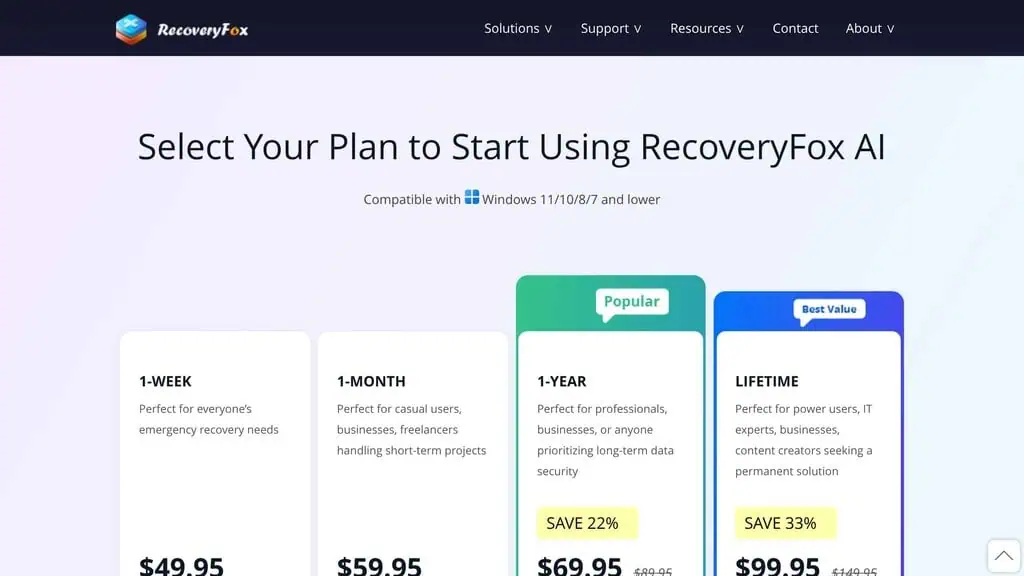
| Plan | Price | Money-Back Guarantee | Auto-Renewal |
|---|---|---|---|
| 1-Week | $49.95 | None (except unresolvable issues) | No |
| 1-Month | $59.95 | 7 days | No |
| 1-Year | $69.95 (was $89.95) | 30 days | No |
| Lifetime | $99.95 (was $149.95) | 30 days | No |
Every plan includes the same core features: AI scanning, 500+ format support, unlimited recovery, file preview, smart filters, and free lifetime updates.
The lifetime plan math
If you think you might need data recovery even twice in your life, the $99.95 lifetime plan pays for itself. Compare:
- EaseUS Data Recovery Wizard Pro: $69.95 per month or $99.95 per year
- Disk Drill Pro: $89 per year
- Stellar Data Recovery: $49.99 per year
- RecoveryFox AI Lifetime: $99.95 one time
After one year, EaseUS has cost you $99.95 or more. RecoveryFox AI has cost you the same amount, but you never pay again. After two years, EaseUS has cost $199.90 and RecoveryFox AI is still $99.95 total.
The math is not close. If you are a home user, photographer, or small business owner who occasionally needs to recover files, the lifetime plan is the obvious choice. The only scenario where the weekly or monthly plan makes sense is a one-time emergency where you know you will never need recovery again.
For anyone tracking AI lifetime deals across categories, RecoveryFox AI at $99.95 is one of the more practical lifetime purchases in the utility tools space.
Education discount
Students and teachers get 30% off any plan. That brings the lifetime price down to approximately $70, which makes it cheaper than a single month of EaseUS. If you are a student or educator looking for AI discount deals, this is one of the better education pricing models I have seen.
Free version: scan and preview only
The unregistered version lets you scan and preview files for free with no restrictions. You only need to pay when you want to actually recover files to a new location.
This is a smart model because it lets you verify that your files are recoverable before committing money. If you prefer fully free AI tools, the scan-and-preview alone is useful for diagnosing what is recoverable.
Where RecoveryFox AI breaks down: Windows only, slow deep scans, no RAID
I am not going to pretend this tool is perfect. Here are the real limitations I found during testing.
No macOS support
This is the biggest gap. RecoveryFox AI works exclusively on Windows (11, 10, 8.1, 8, 7, Vista, and Server editions). If you have a Mac, this tool does not exist for you. WonderFox has not announced any timeline for macOS support.
For Mac users, Disk Drill ($89/year) or Stellar Data Recovery ($49.99/year) are the better options. If you are exclusively Windows, this limitation does not matter.
No Linux or mobile support
Beyond the missing macOS support, there is no Linux version and no mobile app for Android or iOS device recovery. The tool focuses entirely on the Windows desktop experience.
AI Scan speed
The AI Scan is thorough but slow. A full scan on a 500GB drive took around 45 minutes. Quick Scan finished the same drive in under three minutes.
On a 1TB drive, expect to wait over an hour. The Quick Scan finishes in minutes, but it only catches recently deleted files with intact file system records.
This is a tradeoff, not a bug. Deeper scanning requires more time. But if you are in a rush, the wait can feel long.
No RAID or network recovery
If you manage enterprise storage arrays, NAS devices, or RAID configurations, RecoveryFox AI is not the right tool. It handles individual drives, partitions, and removable media. Enterprise recovery requires tools like R-Studio or specialized services.
Basic interface design
The UI is functional but minimal. It gets the job done without any visual flair. Some competitors like Disk Drill have more polished interfaces with better visual feedback during scans. This is purely cosmetic, it does not affect functionality, but it is worth mentioning.
1-week plan has no refund
The cheapest plan ($49.95 for one week) comes with no money-back guarantee. Only the monthly plan gets 7 days, and the annual and lifetime plans get 30 days. If you go with the weekly plan, make sure you are committed before purchasing.
How RecoveryFox AI compares to EaseUS, Disk Drill, and Recuva
Here is how RecoveryFox AI stacks up against the three most common competitors, with more head-to-head software alternative comparisons in our hub:
| Feature | RecoveryFox AI | EaseUS Data Recovery | Disk Drill | Recuva |
|---|---|---|---|---|
| Price | $99.95 lifetime | $69.95/month | $89/year | Free (Pro: $19.95) |
| AI Scanning | Yes | No | No | No |
| File Formats | 500+ | 1,000+ | 400+ | Limited |
| macOS Support | No | Yes | Yes | No |
| Free Recovery | Scan/preview only | 2GB free recovery | 500MB free recovery | Unlimited free recovery |
| File Systems | NTFS, FAT32, exFAT | NTFS, FAT, exFAT, ext2/3/4, HFS+ | NTFS, FAT, exFAT, HFS+, APFS, ext | NTFS, FAT |
| RAID Support | No | Limited | Yes | No |
| Installer Size | 25MB | 150MB+ | 200MB+ | 5MB |
| Interface | Basic | Polished | Polished | Basic |
If you are a Windows user who needs reliable data recovery without a recurring subscription, RecoveryFox AI is the strongest value proposition in this comparison. If you need cross-platform support, look at EaseUS or Disk Drill and accept the ongoing cost.
For more comparisons across AI-powered tools, check the tested AI deals directory where I break down value across categories.
Who should buy RecoveryFox AI, and who should pick another tool
Buy it if you are…
- A Windows user who occasionally loses files and wants a tool ready on standby
- A photographer who works with SD cards and external drives and fears accidental formatting
- A small business owner who cannot afford to lose client files or project data
- A student who needs affordable recovery (the 30% education discount helps)
- Budget-conscious and tired of paying $70+ per month for EaseUS every time you need recovery
When to choose something else:
- Mac users: EaseUS or Disk Drill are your options
- Enterprise/RAID recovery: Disk Drill or R-Studio
- Free recovery with no payment at all: Recuva handles basic deletions
- Maximum file format coverage: EaseUS supports 1,000+ formats
- Needing mobile device recovery. RecoveryFox AI does not recover data directly from phones.
It is not the most feature-rich file recovery software on the market. EaseUS covers more file formats and platforms.
Disk Drill has a slicker interface and RAID support. But both charge you every month or every year. RecoveryFox AI charges once and gives you the same core recovery capability for a fraction of the long-term cost.
For Windows users who need reliable, affordable data recovery with an AI edge, RecoveryFox AI earns a solid recommendation, and it ranks among our best AI tools, especially at the $99.95 lifetime price point. Scan for free first, verify your files are recoverable, and buy only if you see what you need. That model respects your time and your money.
If you want to stay updated on deals like this across the AI tools space, subscribe for weekly AI deal alerts and I will keep you in the loop.
Disclosure: Deal Notification. This tool has not been purchased by zplatform.ai for long-term ownership. The review is based on testing the software’s scanning and recovery capabilities. WonderFox Soft had zero editorial input on this review. Both referral and direct links are provided.
Visit RecoveryFox AI | See Pricing
RecoveryFox AI FAQs
Is RecoveryFox AI actually free to use?
The scan and preview features are completely free with no restrictions. You can scan any drive, see what files are recoverable, and preview their contents without paying.
Payment is only required when you want to recover files to a new location. This makes it risk-free to test before buying.
Can RecoveryFox AI recover files from a formatted drive?
Yes, and this is where the AI Scan mode shines. Quick Scan will find almost nothing on a formatted drive because the file system records have been wiped.
AI Scan reads raw data from the disk surface and uses pattern matching to identify file signatures. In my test on a formatted 500GB drive, it recovered over 4,000 files.
How long does the AI Scan take?
It depends on drive size and speed. In my testing, a 64GB SD card took about 6 minutes, a 500GB external HDD took approximately 45 minutes, and larger drives will take proportionally longer. Quick Scan finishes in seconds to minutes but only catches recently deleted files with intact file system entries.
Does RecoveryFox AI work on SSDs?
Yes, it supports SSD recovery. However, SSDs with TRIM enabled (most modern SSDs) actively zero out deleted data blocks.
This means recovery rates on TRIMmed SSDs will be lower than on HDDs, regardless of which recovery tool you use. For best results, act quickly after data loss on an SSD.
Is the lifetime plan really a one-time payment?
Yes. The $99.95 lifetime plan is a single payment with no recurring charges, no auto-renewal, and includes free updates and priority support permanently. WonderFox Soft has been in business since 2009, which gives reasonable confidence the company will be around to honor lifetime commitments.
Can I recover data from a phone or tablet?
No. RecoveryFox AI recovers data from storage devices connected to a Windows PC, including HDDs, SSDs, USB drives, SD cards, and external drives.
It does not connect directly to Android or iOS devices for internal storage recovery. However, if you remove an SD card from a phone and connect it to your PC via a card reader, you can recover files from that card.
How does RecoveryFox AI compare to free tools like Recuva?
Recuva is free and handles basic deletion recovery well. RecoveryFox AI’s advantage is the AI Scan, which goes deeper on formatted drives, older deletions, and fragmented files.
If you only need to recover a file you just deleted, Recuva works. If you need to recover from a formatted drive or need deeper scanning, RecoveryFox AI’s AI Scan provides significantly better results.
What happens if recovery fails? Can I get a refund?
The monthly, annual, and lifetime plans include money-back guarantees (7 days, 30 days, and 30 days respectively). The weekly plan has no refund except for unresolvable technical issues. I recommend using the free scan-and-preview feature first to confirm your files are recoverable before purchasing.
Pricing and company details: see the RecoveryFox AI profile.
Related Posts

I tested AgainstData on 355 pages of Gmail data. Bulk unsubscribe, personal data deletion requests, pricing, and whether...

AI-Text-Humanizer.com took a 132-word ChatGPT paragraph from 100% AI to 0% on ZeroGPT but flattens your voice. Buy the $...

AIscan24 is a free, no-signup AI detector: it caught pure ChatGPT text at 100% but scored my handwritten paragraph 80%. ...

Honest Aithenticate review after hands-on testing. Does this AI disclosure badge tool meet EU AI Act requirements? Prici...

My hands-on Answer Socrates review covering all features, free plan limits, pricing, and how it compares to AlsoAsked. I...

I’ve spent $4,200 on 118 AppSumo lifetime deals over 5 years. Here’s my honest review: what works, what fails, and wheth...