

Verdict: Buy
Outscraper in short: hit rate and the real per-contact bill
| Field | Detail |
|---|---|
| Tool | Outscraper (Google Maps Scraper) |
| Category | Cloud-based Google Maps data extractor with contact enrichment. It runs on Outscraper’s servers, so proxy rotation, CAPTCHA solving and IP blocking are their problem rather than yours. |
| Best use case | Building validated, hyper-local B2B prospecting lists without running your own proxy infrastructure |
| Price | Free tier: yes. 500 Maps records, 500 email domain lookups, 25 email verifications. Then pay-as-you-go with no subscription: $3 per 1,000 records up to 100,000, $1 per 1,000 above that. Email scraper $3 per 1,000 domains, verifier $3 per 1,000 emails, phone lookup $5 per 1,000. |
| Email hit rate in my test | 8 of 20 businesses (40%), so test your own niche before scaling |
| Verdict | Test it on the free 500 records for your industry, then scale, unless you are pulling millions of records per month |
Most Google Maps scrapers promise clean, accurate data and deliver blocked IPs, broken proxies and half-empty spreadsheets. I have lost real money on DIY scraping setups that Google shut down within hours, so when Outscraper showed up as a cloud extractor that handles the proxy problem entirely, I picked it up on AppSumo and ran it against a market I know: accountants in Coimbatore, Tamil Nadu.
What Outscraper extracts, and why it runs in the cloud
Outscraper is a cloud-based Google Maps data extractor. You define a business category, a location and a results limit; Outscraper scrapes Google Maps on its servers and returns a CSV, XLSX, Parquet or JSON file with business names, addresses, phones, ratings, working hours, coordinates and more. Optional paid enrichment adds email discovery, email verification, phone lookup, WhatsApp validation, company insights and Trustpilot data. It is used mainly for lead generation, local SEO research, competitive intelligence and agency prospecting.
The cloud part is the reason it exists. Google throttles automated Maps requests with CAPTCHAs, then IP bans. Rotating past bans needs residential proxies, because data-center proxies get flagged immediately, and residential proxies are expensive, fragile and need constant babysitting as Google updates its bot detection, as I found testing the residential IPs in my Infatica proxy review. I have seen people spend $200/month on proxy infrastructure just to reliably scrape 5,000 leads a week. Outscraper’s servers absorb the proxy rotation, CAPTCHA solving and rate limiting instead.
The core scraper is a single page at outscraper.com, with every setting visible without sub-menus, and links to pricing, API docs and a long-form tutorial covering every parameter with examples. I read the tutorial before my first test and it answered most questions upfront.
Setting up a scrape: categories, Exact Match and ZIP targeting
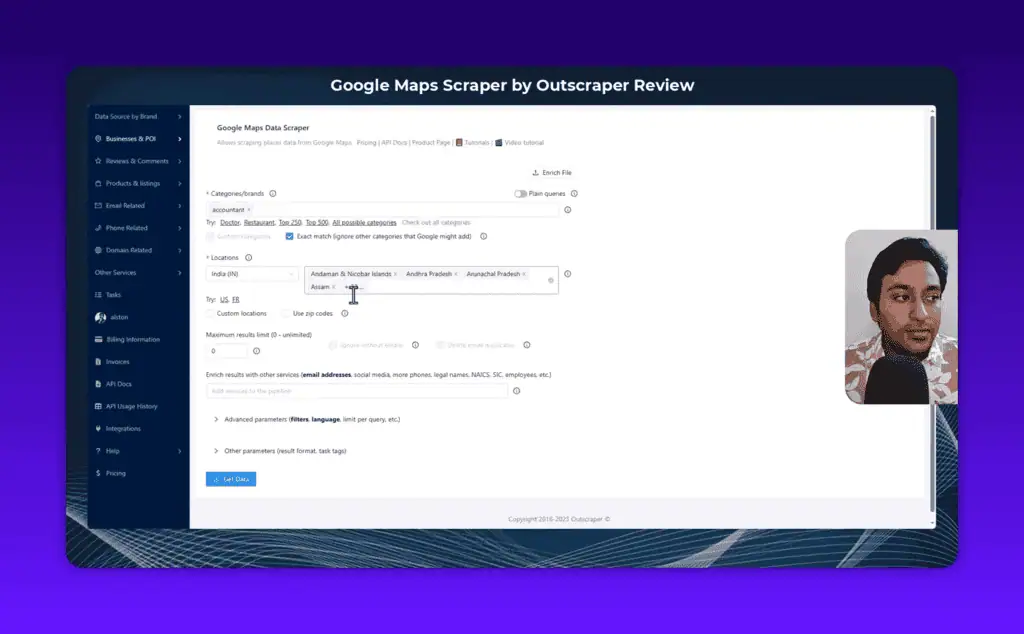
The category field comes first. Predefined categories draw on Outscraper’s database of Google Business categories: start typing (“food,” “legal,” “accountant”) and you get dropdown suggestions with descriptions, and you can select several at once. A custom query takes a keyword as you would type it into Google Maps, for niches the list does not cover. Outscraper also keeps a public page listing all Google Business categories with counts and an Excel download, which helps when you are not sure what term to search.
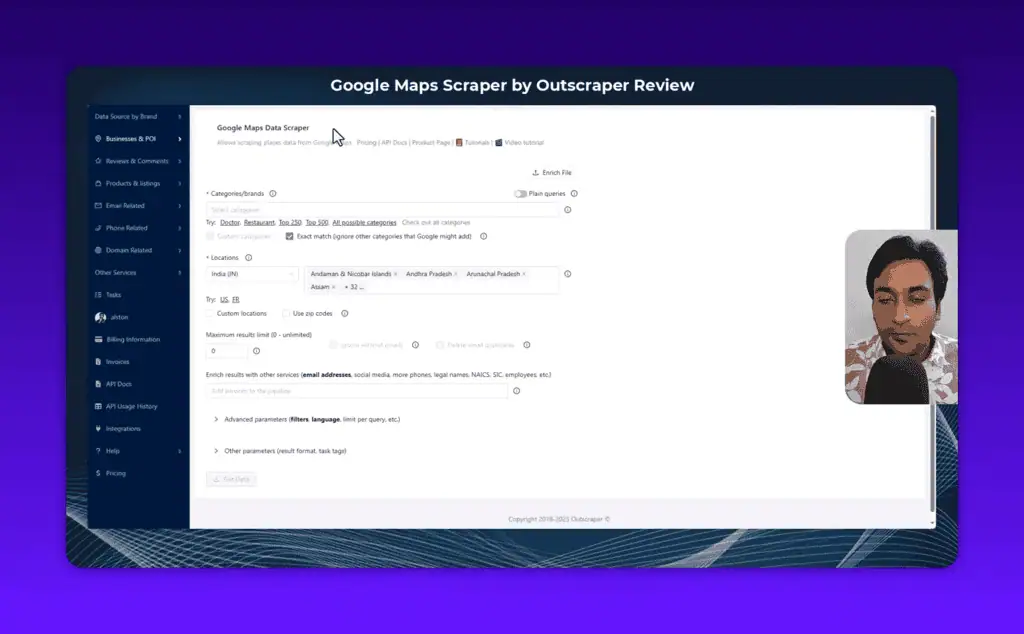
Always enable Exact Match. Without it, Google Maps serves loosely related businesses it thinks are “useful”: I searched for accountants and got tax consulting firms, bookkeeping services and a few financial planners I didn’t want. Exact Match adds a subtype filter that requires the business category to contain your search term, and it was the difference between a clean accountant list and a padded one.
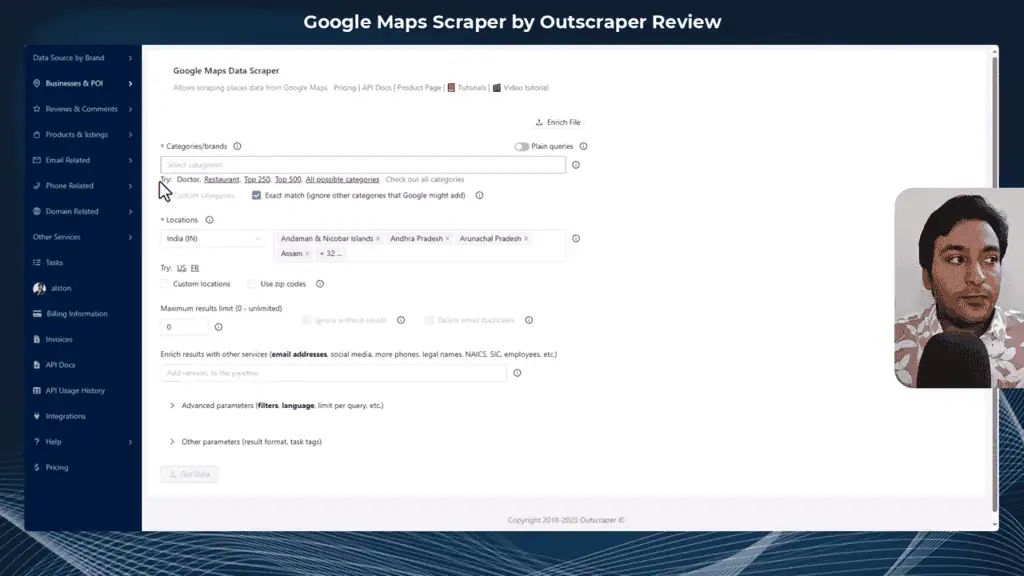
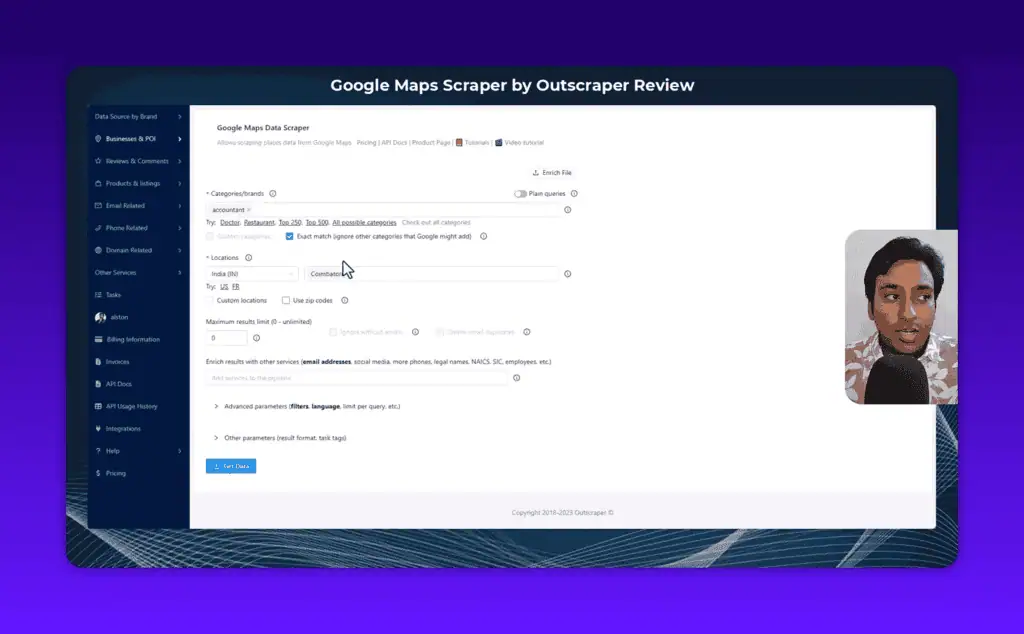
Location targeting goes four levels deep where most scrapers stop at country or city: country, state or region, city, then ZIP or postal code. For my test I selected India, drilled down to Tamil Nadu, then Coimbatore, with each dropdown updating as I went. You can also upload a custom location list (city, ZIP, or “city + country” format) for multi-location campaigns. Country-level results are too big to act on for outreach; ZIP-level lists are what local agencies and city-focused campaigns need.
Enrichment: where the emails come from
Google Maps profiles list phones, websites and addresses but no email addresses, so email data has to come from enrichment. The panel appears once category and location are set:
- Email and Contact Scraper scans each business’s website for addresses. The first 500 domains are free, then $3 per 1,000 at medium scale. In my test of 20 accountants it found emails for 8 of them (40% hit rate).
- Email Verifier runs format, DNS, SMTP and blacklist checks and labels each email valid, invalid or risky.
- Phone Number Lookup returns carrier data and validates numbers for deliverability.
- WhatsApp Checker confirms whether a number is on WhatsApp, which matters where WhatsApp is the main outreach channel (most of Southeast Asia, Latin America, India).
- Company Insights adds revenue range, headcount, founding year and public/private status.
- Trustpilot Scraper pulls Trustpilot review data for any business with a profile, and Yellow Pages Search adds Yellow Pages data.
Enrichers stack on one job and configure independently. I stack Email Scraper plus Email Verifier: it costs more, but the validated output goes straight into outreach without a separate cleaning step, though a dedicated tool like the one in my Reoon Email Verifier review validates lists more cheaply at scale. Inside the email enricher, “Delete entries without emails” drops rows with no address found, so the export only holds actionable contacts.
Advanced parameters that turn a scrape into a prospect list
- Subtype filter: require the business subtype to contain or not contain specific terms, for control beyond Exact Match.
- Postal code filter: include or exclude specific postal codes.
- Business status: operational, temporarily closed or permanently closed. If you sell GMB management, the “verified: false” filter alone is a complete prospecting system.
- Rating filter: target businesses above or below a rating threshold.
- Places per query: caps results per individual search, which controls credit spend on broad queries.
- Drop duplicates: removes businesses listed under several categories, so one listed under both “Accountant” and “Tax Advisor” does not export twice.
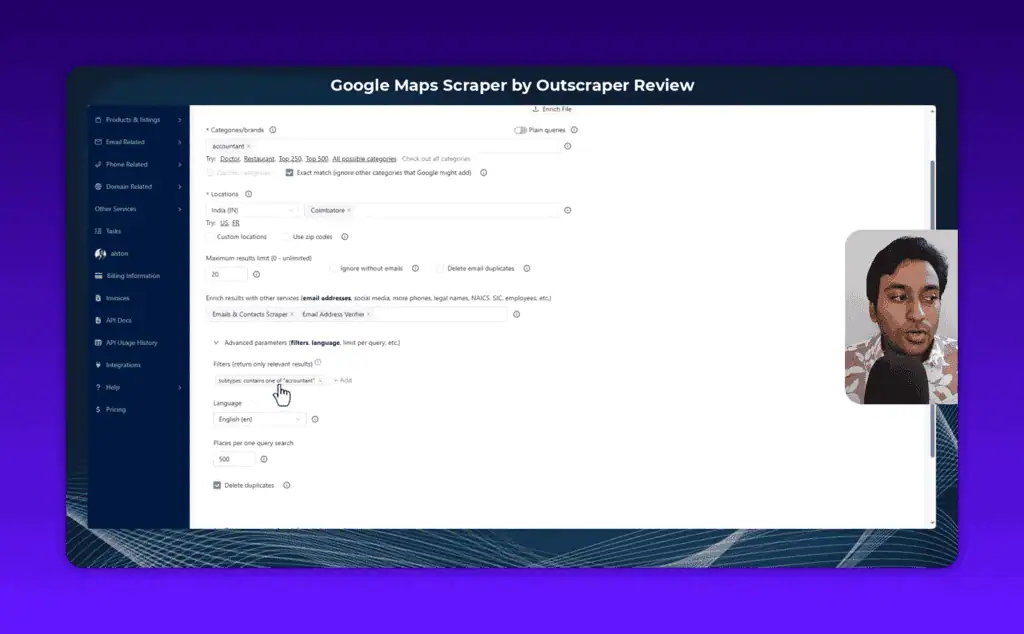
Location targeting, Exact Match, subtype and status filters together give more control over a Google Maps scrape than I have seen in competing tools.
The confirmation modal caught a 5,000-record mistake
“Get Data” does not execute immediately. A confirmation modal shows the exact query with a live Google Maps link you can click to check results before spending credits, the estimated result count, estimated credit usage and rough time to completion.
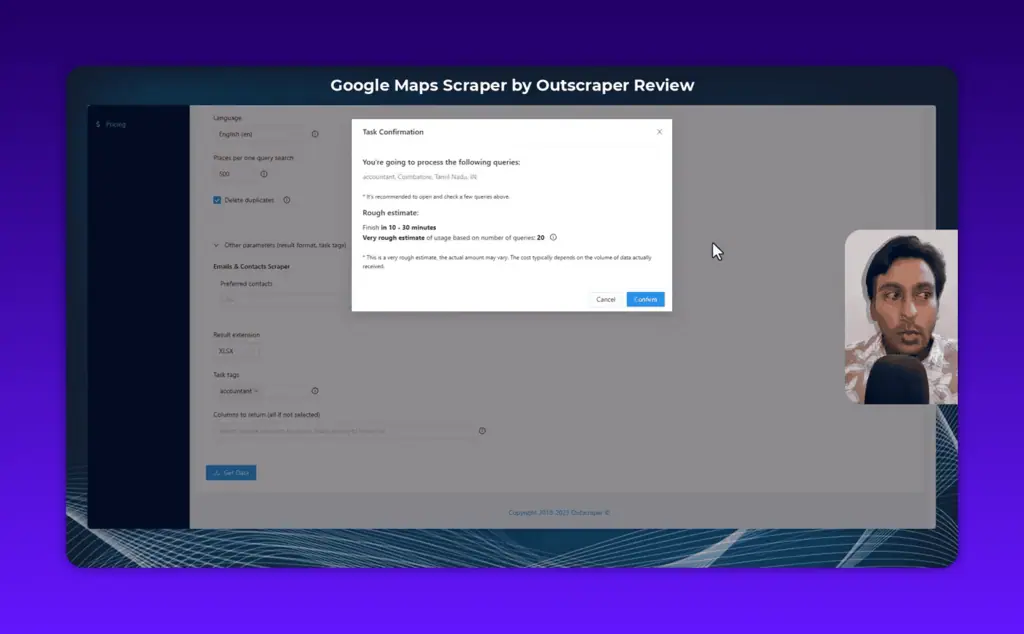
It caught a misconfigured query where I was about to pull 5,000-plus records for a job I wanted capped at 200; I went back and narrowed the location before confirming. My 20-result demo then ran in about 2 to 3 minutes.
What a row of Outscraper data contains
Standard scrape output (per business): Name, website URL, category, subcategory, phone, full address, borough, street, city, postal code, state, country, country code, latitude, longitude, timezone, plus code, rating, review count, review link, photos count, photo link, street view link, working hours (JSON format), working hours (legacy format), popular times, business status, verified status.
Plus identifiers: about section, price range, logo link, description, owner ID, owner title, reservation link, appointment link, menu link, order link, Place ID, Google ID, CID.
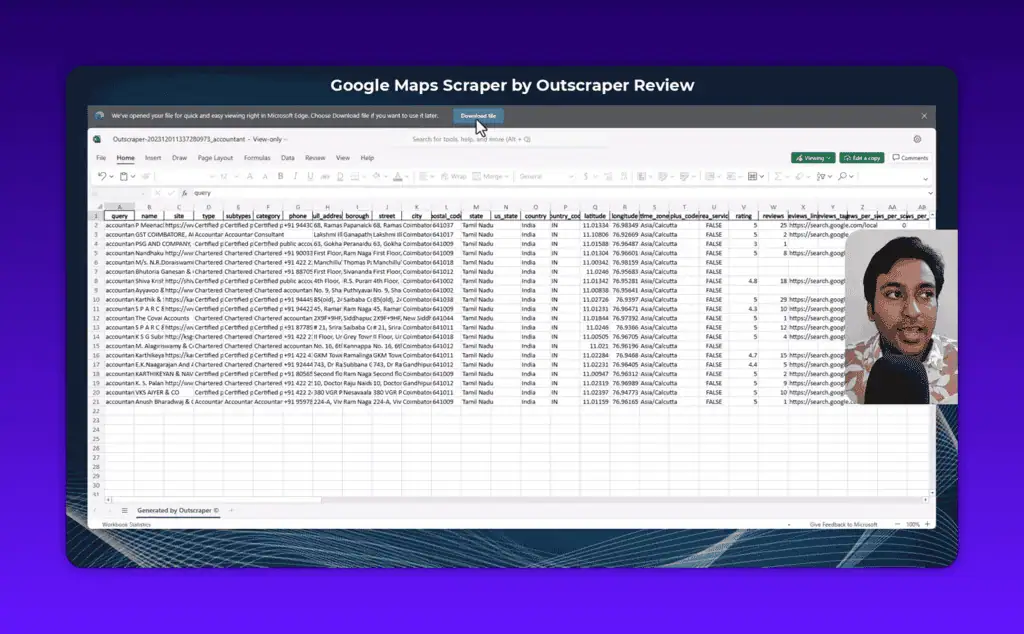
With email enrichment added: up to 3 discovered email addresses per business, each with validation status (valid/invalid/risky), format check flag, blacklist flag, DNS check result and SMTP check result, plus social media profile links where discoverable.
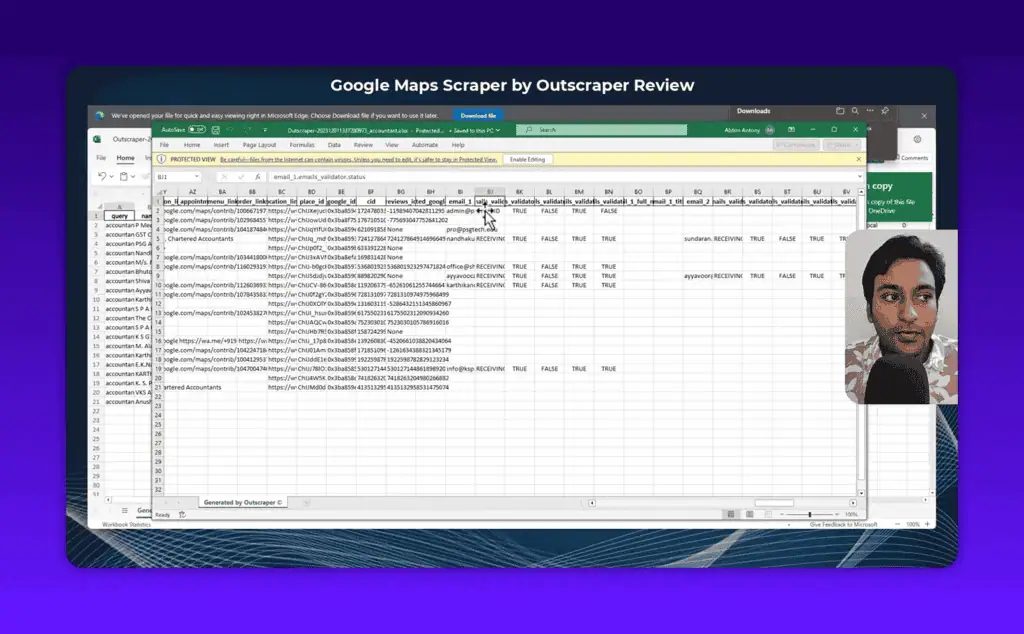
Of my 8 emails from 20 businesses, some came back invalid, and the validation columns told me which to use and which to skip rather than leaving me to find out by bouncing. That is the case for running scraping and verification together.
Jobs run asynchronously. You can save a configuration as a template and rerun it with one click, schedule recurring runs weekly or monthly, and share a public download link so a VA or client gets the data without your login. A full REST API with official Python and JavaScript SDKs on GitHub uses the same credit pool, so scrapes can be triggered from n8n, Make, Zapier or your own scripts.
Outscraper pricing per 1,000 records
Outscraper is pay-as-you-go: no monthly subscription, no recurring billing. You pay for the records you process.
Google Maps Scraper
| Volume | Price per 1,000 records |
|---|---|
| First 500 (free tier) | $0 |
| 501 to 100,000 | $3 |
| 100,000+ | $1 |
Email and Contact Scraper
| Volume | Price per 1,000 domains |
|---|---|
| First 500 (free tier) | $0 |
| 501 to 100,000 | $3 |
| 100,000+ | $1 |
Email Verifier
| Volume | Price per 1,000 emails |
|---|---|
| First 25 (free tier) | $0 |
| 26 to 100,000 | $3 |
| 100,000+ | $1 |
Phone Number Lookup
| Volume | Price per 1,000 phones |
|---|---|
| First 25 (free tier) | $0 |
| 26 to 50,000 | $5 |
| 50,000+ | $3 |
Real cost example: Scrape 1,000 businesses with email discovery and verification = $3 (Maps) + $3 (Email Scraper) + $3 (Verifier) = $9 total for a validated, outreach-ready lead list. Above 100,000 records a month the Business tier brings Maps data down to $1/1,000. Google reviews are a separate tool, the Google Maps Reviews Scraper, on the same structure: $3 per 1,000 reviews at medium scale.
The AppSumo lifetime deal for Outscraper offered a substantial credit allocation at a one-time price, which changes the economics for smaller teams. If you are looking for AI lifetime deals on data tools, check whether it is still available.
Apify, Leads Sniper, Lobstr.io or a DIY stack?
| Alternative | Price | Pick it instead when |
|---|---|---|
| Apify | Free plan with $5 monthly credits; Starter $29 per month, Scale $199, Business $999 | You need a general-purpose scraping platform with workflow integration, and can accept a third-party-maintained Maps actor plus a steeper learning curve |
| Leads Sniper | One-time $149, $267 or $389 depending on installation count | You want unlimited raw Google Maps lists with no per-record billing and do not need enrichment depth |
| Lobstr.io | Free plan capped at 30 rows per export with 7-day retention and no scheduling; paid pricing quoted through their usage simulator | You need LinkedIn and Instagram scraping alongside Maps and can accept a less mature Maps module |
| DIY Python plus residential proxies | Roughly $200 per month for proxy infrastructure at 5,000 leads per week, plus engineering time | You are scraping at millions of records per month and have someone to maintain the stack as Google’s bot detection changes |
Apify is more flexible: you can build workflows, connect n8n or Make and customise the scraper. But its Google Maps actor is third-party maintained, so quality varies, and Apify Proxy costs escalate quickly. If you only need Maps data, Outscraper is the more focused choice. Leads Sniper has a simpler interface for non-technical users and competes on raw lists, but has no WhatsApp checker, limited email validation and no Trustpilot scraper. Lobstr.io’s main focus is social media data; Outscraper’s Maps module has more filters, better enrichment coverage and a deeper output schema.
A DIY scraper with rotating residential proxies gives you more control if you have strong Python skills, at the cost of proxy management, CAPTCHA handling, rate-limiting logic and maintenance every time Google changes its detection. For the proxy layer that build would need, see the Infatica proxy review. For cheaper bulk email validation than the built-in enricher, see the Reoon Email Verifier review.
Is scraping Google Maps legal?
Scraping publicly available data is generally permitted under current US law. The 2022 US Court of Appeals ruling in hiQ Labs v. LinkedIn confirmed that automated access to publicly accessible web data does not violate the Computer Fraud and Abuse Act, and Google Maps business data (names, addresses, phones, hours) is viewable by anyone without logging in. Three caveats apply:
- Google’s Terms of Service prohibit automated scraping. That is a contractual issue, not a criminal one, but Google can and does block accounts and IPs. A cloud tool moves the blocking risk to the vendor’s servers; it does not make the ToS issue disappear.
- How you use the data matters. Bulk unsolicited email may violate CAN-SPAM (US), GDPR (EU), Canada’s CASL or India’s DPDP Act depending on jurisdiction and targeting. B2B outreach to business addresses with proper opt-out is generally within legal territory. Consumer email is more regulated, and the compliance exposure is yours, not the vendor’s.
- Personal addresses change the picture. Generic info@ addresses are straightforward B2B territory; owner-name addresses (owner@) bring GDPR and similar rules into play.
Standard B2B prospecting with Outscraper sits within the mainstream of what lead generation teams do legally. Consult a lawyer for your specific situation.
Where Outscraper costs more than the headline price
- A 40% email hit rate makes each usable contact cost about 2.5 times the list price. Email discovery found addresses for 8 of 20 businesses in my test, and some of those were invalid. That rate is normal for the category, and it varies by industry and region, so nobody can promise you a figure.
- Enrichment costs compound. A validated 1,000-lead list is $9, not $3, because Maps data, email discovery and verification each bill separately.
- The free tier is small where it matters most. 500 Maps records is a real test; 25 email verifications is not.
- Exact Match is off by default. Leave it off and you pay for adjacent categories, then pay again in time cleaning them out.
- Duplicates appear unless you enable Drop duplicates. A business listed under two categories exports twice and burns credits twice.
- No unlimited tier exists. Every record is billed, so broad exploratory queries have a direct cost, which is what the confirmation modal protects you from.
- Speed depends on shared server load. Larger jobs take longer than my 2 to 3 minute demo and queue times rise when many users run jobs at once. The completion estimate is a rough guide, and nothing here is real-time.
- No native CRM sync. The workflow is export and import.
Who Outscraper suits, and who should build their own
- Local agencies building city-level prospect lists. ZIP-code targeting plus Exact Match is what makes hyper-local lists usable.
- B2B sales teams running cold outreach. Scrape a category, add email discovery and verification, export straight into your outreach platform.
- Reputation management agencies. The unverified-listing filter and rating data are ready-made prospecting signals.
- Competitive researchers. Ratings, review counts, photo counts and hours across an entire local market in one export.
- Local SEO consultants. Citation gaps, missing contact data and unverified listings all surface in the output.
- VA-assisted teams. Public download links hand over data without handing over account credentials.
It is the wrong tool if you need real-time data, run consumer-facing email campaigns, or scrape millions of records a month, where self-hosted infrastructure is cheaper even counting maintenance.
Verdict: test one city before you scale
Outscraper removes the proxy headache, the CAPTCHA grind and the maintenance of DIY scraping, and the Email Scraper plus Verifier pair makes it a complete lead data workflow rather than a raw extractor. For agencies, growth teams and sales teams doing focused outreach, it is the cleanest Google Maps scraping tool I have tested, and it earns a spot among our best AI tools for outreach.
The proxy problem is solved here; contact coverage is the variable, and only your own niche can tell you what it is. So spend $20 to $30 on one city and one category you are prospecting, check the email hit rate for that industry, and scale only if it meets your bar. The 500 free records are enough to judge output quality for your geography before you pay anything.
Pricing and company details: see the Outscraper profile.
Related Posts

I tested AgainstData on 355 pages of Gmail data. Bulk unsubscribe, personal data deletion requests, pricing, and whether...

AI-Text-Humanizer.com took a 132-word ChatGPT paragraph from 100% AI to 0% on ZeroGPT but flattens your voice. Buy the $...

AIscan24 is a free, no-signup AI detector: it caught pure ChatGPT text at 100% but scored my handwritten paragraph 80%. ...

Honest Aithenticate review after hands-on testing. Does this AI disclosure badge tool meet EU AI Act requirements? Prici...

My hands-on Answer Socrates review covering all features, free plan limits, pricing, and how it compares to AlsoAsked. I...

I’ve spent $4,200 on 118 AppSumo lifetime deals over 5 years. Here’s my honest review: what works, what fails, and wheth...