

Verdict: Buy
How far Reoon’s credits go, and what they cost
| Field | Detail |
|---|---|
| Tool | Reoon Email Verifier, from Reoon Technology |
| Category | Email verification: bulk list cleaning, real-time form validation and API. Each address gets a score out of 100 and a status of Safe, Invalid, Risky, Unknown or Catch-All |
| Best use case | Cleaning cold email lists and blocking invalid addresses at form submission (Contact Form 7, Gravity Forms, Formidable Forms) without a monthly bill |
| Price | Free tier: yes, 600 verifications per month plus 100 one-time instant credits, no card. Subscription $9 per month for 500 daily credits. Instant credits from $11.90 per 10,000 ($0.00119 each) down to $960 per million ($0.00096). AppSumo lifetime deal from $79 for 500 daily credits plus 100,000 bonus credits, up to $316 for 3,200 per day (AppSumo pricing as of June 2026). |
| Accuracy | 99% on mixed-quality lists, from Reoon’s own testing; no published third-party benchmark |
| Verdict | Buy the lifetime deal if you verify regularly; it breaks even against the $9 plan in under nine months and is the cheapest credible option in this category |
What Reoon Email Verifier checks, in order
Reoon Email Verifier is a cloud-based email verification service built by Reoon Technology, and it does one job: telling you whether an address is safe to send to before you send. Verification runs as a sequence of checks, and the order explains why some results are definitive and others cannot be.
- Syntax validation. Is the address structurally valid at all.
- Disposable detection. Does the domain belong to a throwaway provider. Reoon uses its own detection rather than a static blocklist, which matters because new disposable services appear constantly and a fixed list goes stale.
- Role-based detection. Flags admin@, support@, postmaster@ and similar addresses that are not tied to a person.
- MX record check. Does the domain have working mail exchange records.
- SMTP validation. Does the receiving server accept that specific address.
- Inbox status. Is the mailbox active or full.
Reoon supports Gmail, Yahoo, Outlook, Hotmail, and custom domain verification, and if you also manage Gmail at scale, our cloudHQ Gmail tools review is worth a look. It also flags spamtrap addresses and complaint emails, the kind of addresses that can get your domain blacklisted quickly.
Three jobs account for most use: cleaning a cold email list before you import it into an outreach tool, blocking unsafe addresses at form submission on your own site, and routing leads in a CRM or automation tool by email quality through the API.
How accurate is Reoon email verification?
Reoon claims 99% accuracy for mixed quality lists, meaning lists with a blend of valid addresses, disposable emails, role accounts, and catch-all domains. That figure comes from Reoon’s own testing, and there is no published third-party comparison at scale.
I have been running cold email campaigns and building lead generation forms for clients for years, often paired with a Reddit and LinkedIn lead-gen agent. I use Reoon on the AppSumo lifetime deal myself, and I tested it across all four surfaces: single verification, bulk list cleaning, the WordPress plugin and the REST API wired into a Pabbly Connect automation.
What checked out: single verifications returned in a few seconds with the full per-check breakdown, and the addresses I already knew were dead came back invalid. Disposable addresses from common throwaway services were caught. Catch-all domains were flagged as mixed quality rather than being quietly marked safe, which is the behaviour that tells you whether a verifier is honest. Bulk processing times matched the published 8 to 12 minutes per 10,000.
What I have not done: I have not run a large-scale A/B test against NeverBounce or ZeroBounce, so I cannot confirm the 99% figure independently. The per-address results I checked by hand were accurate, which is a different and weaker statement than a benchmark.
Reoon Email Verifier dashboard and daily credits
The first thing you see when you log into Reoon is the overview dashboard. It shows your daily credits remaining, instant credits balance, lifetime usage totals, and a bar graph of verification activity by day.

The credit system has two separate pools. Daily Credits renew automatically every day: 500 per day on the $9/month subscription, or a fixed daily allocation on the AppSumo lifetime deal based on how many codes you bought. They reset at midnight, so unused credits from one day do not roll over.
Instant Credits are one-time credits that never expire. They work from a separate balance and suit batch jobs that exceed your daily limit or one-off verification tasks. The AppSumo lifetime deal includes both, which is what makes it interesting: renewable daily capacity without a subscription, plus a reserve for larger jobs.
How to verify a single email with Reoon
You type the address into the input field and click verify. Reoon runs through all its checks and returns a result in a few seconds.
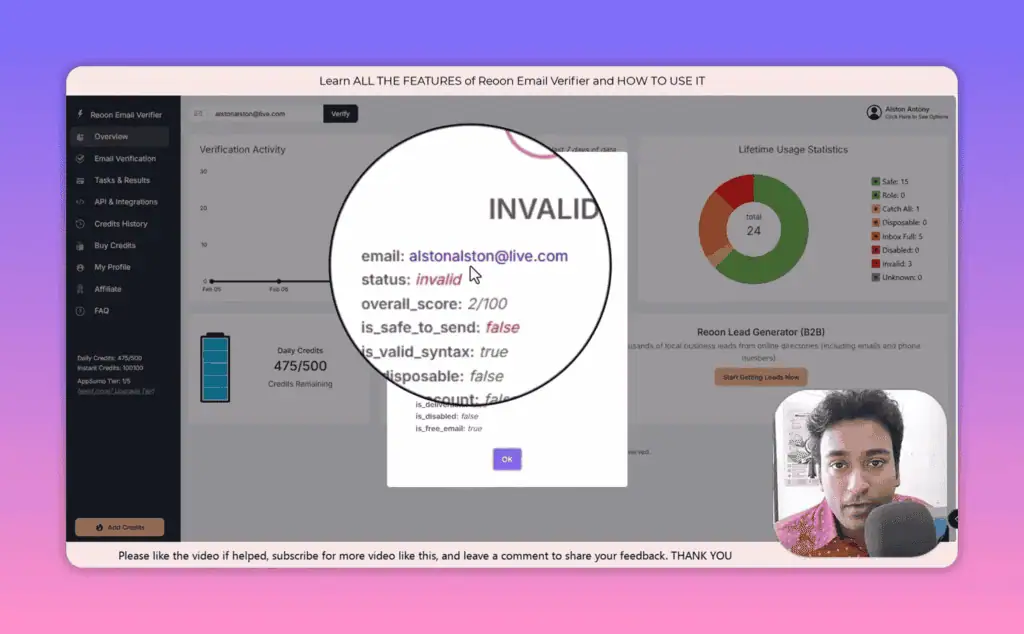
The result screen shows:
- Overall score out of 100
- Status: Safe, Invalid, Risky, Unknown, or Catch-All
- Breakdown by check: syntax, disposable status, role-based flag, MX record, SMTP result, inbox status
- Credit deduction confirmation
One credit equals one email verification. If the result comes back as “Unknown” (meaning the server did not respond clearly), Reoon does not charge you. That policy matters for large lists where a significant portion of addresses might time out.
Bulk email verification: 10,000 addresses in 8 to 12 minutes
This is the core use case for most people. The bulk verification screen gives you two input methods.
Copy-paste: Paste a list of email addresses directly into the text box. Give the task a name, click start verification, and Reoon queues it for processing.
File upload: Upload a TXT file (one email per line) or a CSV file (with email addresses in one or more columns). If your CSV has multiple rows with identical data, you can tick a box to remove duplicate entries before processing starts.
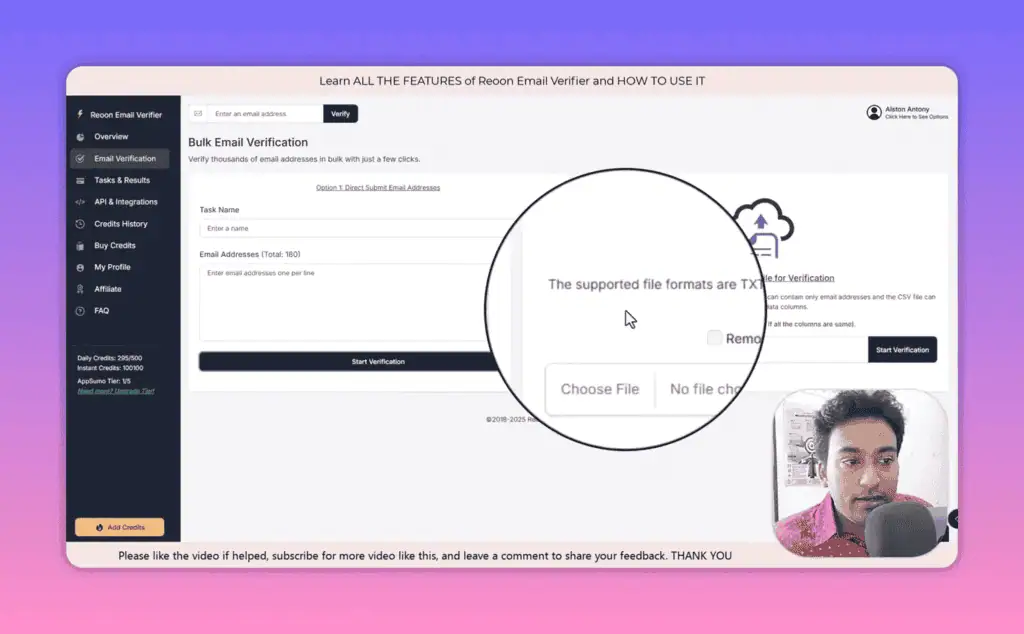
According to Reoon’s own testing, 10,000 email addresses take between 8 and 12 minutes to verify, and my runs were consistent with that. Running 10,000 addresses while you work on something else before a campaign launch is completely reasonable.
Task results, statistics, and export options
Once verification completes, the task results screen shows the breakdown by category: how many addresses are Safe, Invalid, have a full inbox, are disposable, or fall into other categories.
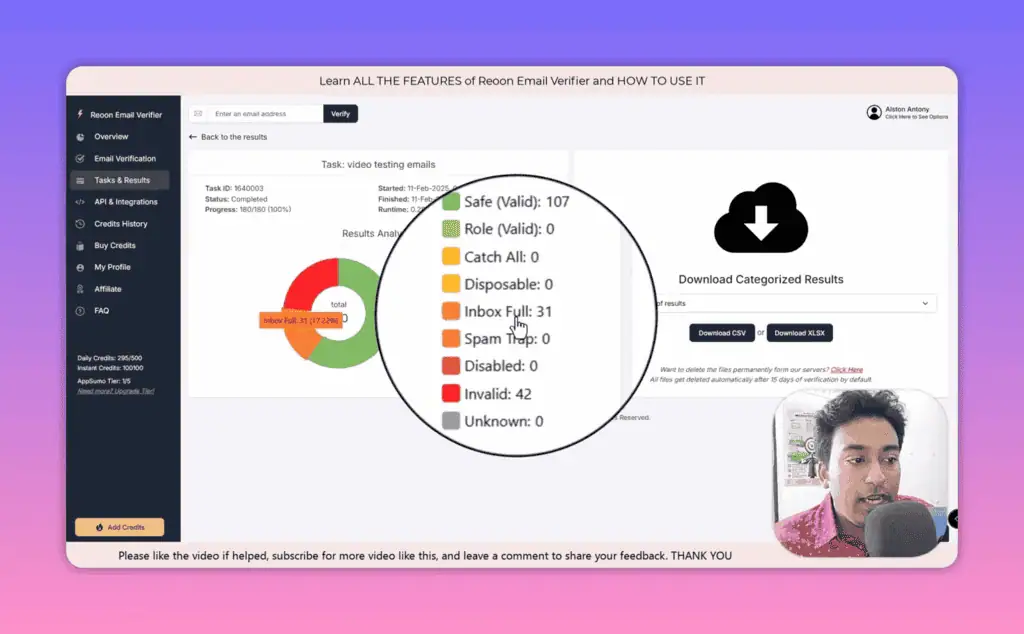
The export options let you download by category. You can download only the Safe addresses (the ones ready to mail), or the full list with all statuses included. That makes segmenting easy: safe addresses go into your outreach sequence, risky or unknown addresses go into a re-engagement test, invalid addresses get removed.
The export files come as Excel or CSV. The Excel file includes color-coded status columns alongside the email address, username, domain, and each individual check result, so you can see why a specific address was flagged rather than just a red or green label.
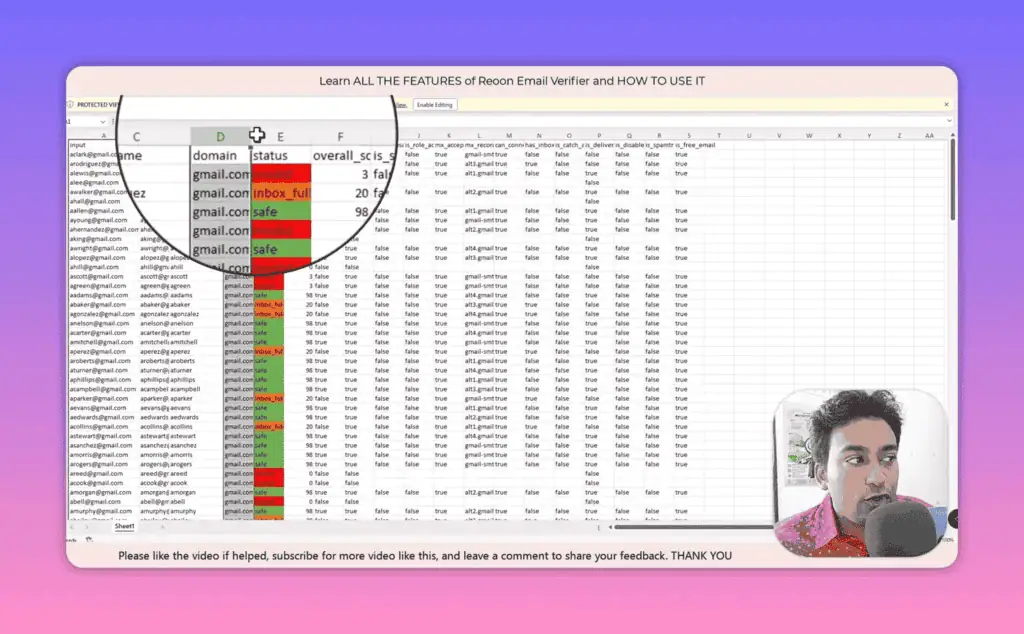
Task data is retained for 15 days after verification, then automatically deleted. That is a reasonable policy for privacy compliance (Reoon is GDPR compliant with AES-256 encryption), but it requires a habit of exporting promptly.
Reoon WordPress plugin: Quick mode vs power mode
The WordPress plugin is where Reoon becomes useful for anyone running lead generation forms, much like the other AI plugins for WordPress we rank. Rather than cleaning email lists after the fact, you validate addresses at the point of entry.
Installing the plugin is standard: register a Reoon account if you have not already, search “Reoon Email Verifier” in the WordPress plugin directory, install, activate, and enter your API key from the Reoon dashboard. The plugin syncs to your account automatically.
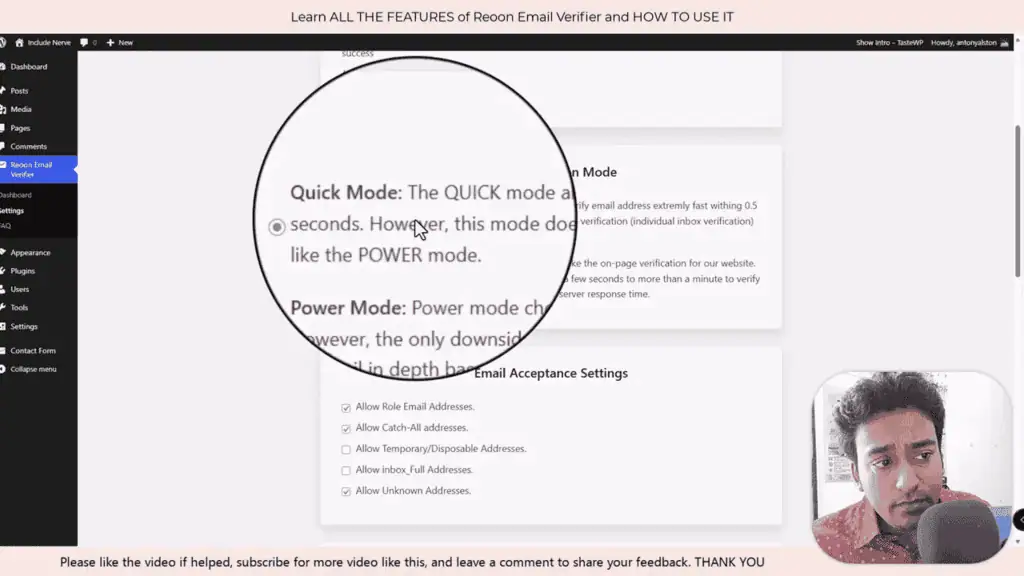
Quick Mode validates an email live within 0.5 seconds. It checks syntax, disposable domains, and MX records, fast enough that most users filling out a form will not notice any delay. Use it for real-time form validation where speed matters more than depth.
Power Mode runs a deeper scan including SMTP validation and inbox status. It takes a few seconds longer but catches more borderline cases. Use it when list quality is critical, such as high-value lead gen campaigns or before a large cold email send.
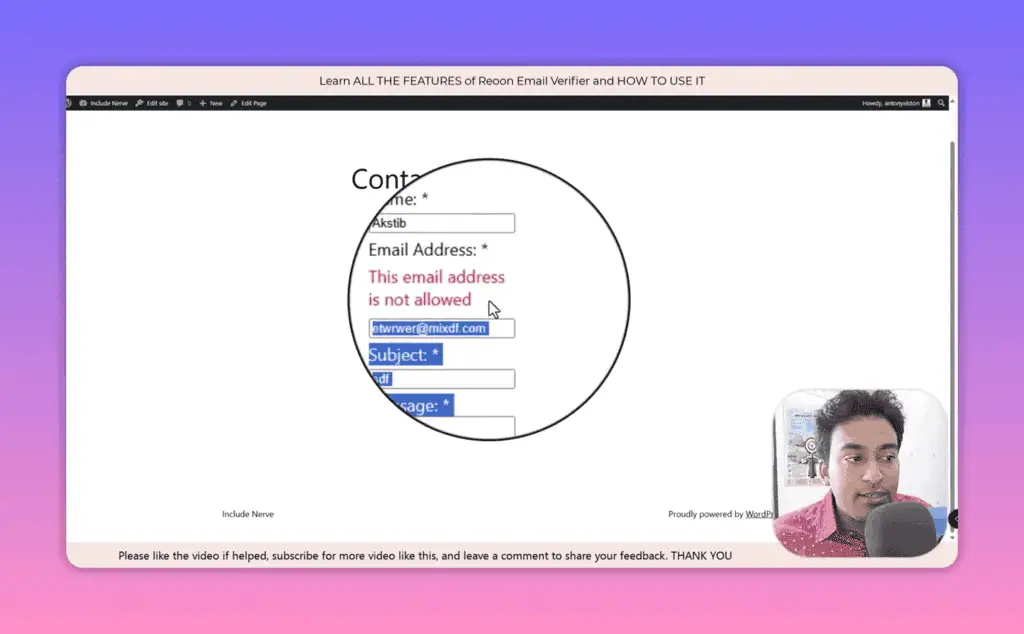
The plugin natively supports the most common WordPress form builders: Contact Form 7, Gravity Forms, Formidable Forms, and others. Setup is a checkbox in the plugin settings, not a custom integration job. When a user submits a form with an email address that fails verification, the plugin blocks the submission and displays an error message you write yourself, in whatever language fits your site.
The plugin dashboard also shows site-specific verification stats separately from your main account: how many addresses were checked on each connected site, how many were valid versus invalid, and how long each check took. That separation is what makes it workable for agencies validating client forms.
Reoon Email Verifier API: Integration and automation
The documentation covers two endpoint types: single email validation and bulk email validation, with separate URLs for Quick Mode and Power Mode calls. The API uses a plain GET request, so it works with any tool that can make HTTP requests, including Zapier, Make (formerly Integromat), Pabbly Connect, n8n, or your own code.
In Pabbly, I set up a workflow that triggers when a contact form is submitted on a third-party landing page. The workflow captures the submitted email address, then passes it to Pabbly’s “API” module as a GET request: I plug in the Quick Mode URL from Reoon, map the email field from the form submission to the email parameter, and paste in my API key.
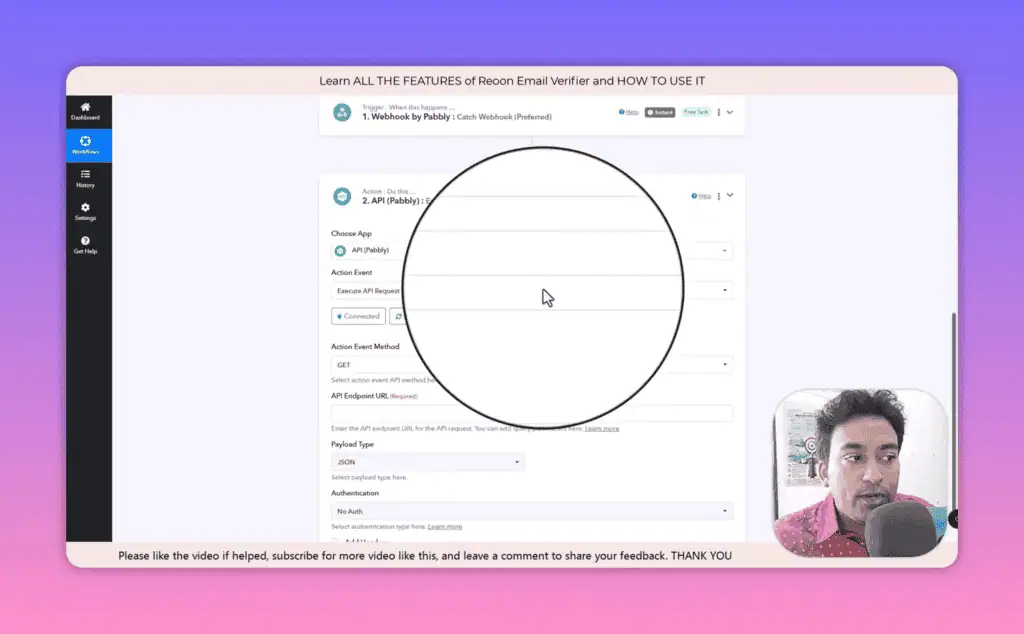
The API returns a JSON response with the validation status. From there, I add a router: if the status is “valid”, the contact gets added to the CRM and enrolled in the welcome sequence. If the status is anything else, a different path triggers: a follow-up asking them to re-enter their email, or a silent discard.
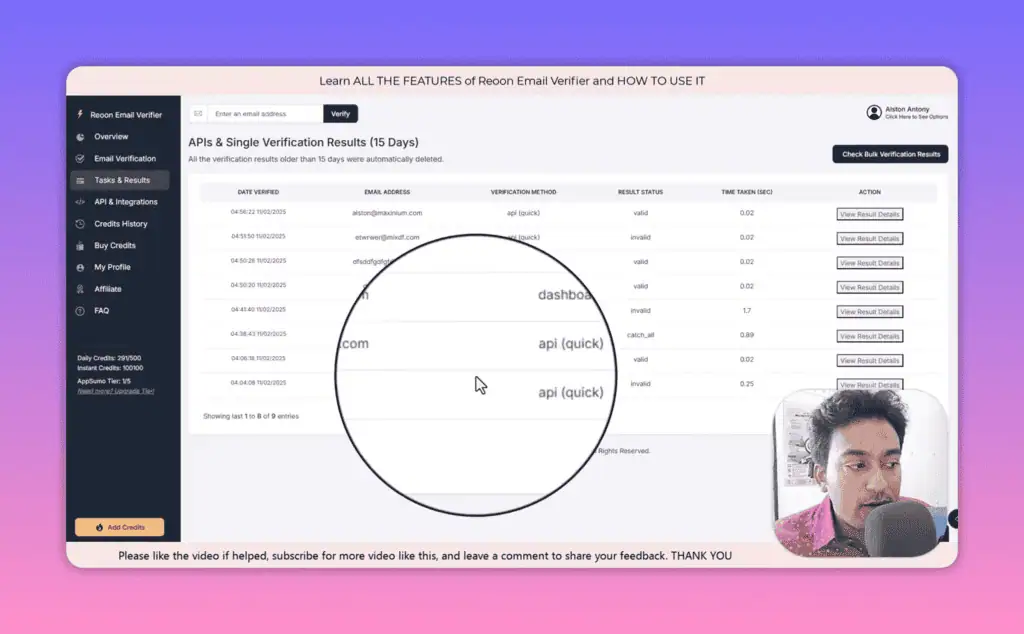
All API calls appear in the Reoon dashboard under “Check API” in the Task and Results section, with the email address checked and the result returned, which is useful for debugging and for auditing how your automation is performing. If you are unsure how to build the request, paste the documentation into ChatGPT with a description of your automation tool; that works well for non-developers who understand the concept but need help with the syntax.
Reoon Email Verifier pricing
Reoon has three main ways to pay.
Free tier
The free plan gives you 600 email verifications per month plus 100 one-time instant credits, no credit card required, and all features are accessible. If you are comparing free AI tools before spending money, Reoon’s free tier is one of the more generous ones in this category, though it is enough to test the tool rather than clean a real list.
Daily credits subscription
$9 per month gives you 500 daily credits that renew every 24 hours. The cost per verification drops as low as $0.0005 at higher volumes. This option suits businesses with ongoing verification needs, such as running forms continuously.
Instant credits (one-time purchase)
These never expire and work from a separate balance, which suits sporadic large jobs where you do not want a recurring subscription:
| Credit Amount | Price | Cost Per Email |
|---|---|---|
| 10,000 credits | $11.90 | $0.00119 |
| 25,000 credits | $29.66 | $0.00119 |
| 50,000 credits | $58.95 | $0.00118 |
| 100,000 credits | $116.40 | $0.00116 |
| 500,000 credits | $522.00 | $0.00104 |
| 1,000,000 credits | $960.00 | $0.00096 |
Reoon AppSumo lifetime deal: Is it worth it?
As of June 2026 the AppSumo deal is active and running at an 81% discount from regular pricing. This is a genuine AI lifetime deal: you pay once, get daily credits that renew forever, and make no future monthly payments. It includes all future updates.
| Plan | AppSumo Price | Regular Price | Daily Credits | Bonus Lifetime Credits |
|---|---|---|---|---|
| 1 Code | $79 | $418.50 | 500/day | 100,000 |
| 2 Codes | $158 | $837.00 | 1,200/day | 220,000 |
| 3 Codes | $237 | $1,255.50 | 2,100/day | 360,000 |
| 4 Codes | $316 | $1,674.00 | 3,200/day | 520,000 |
The breakeven for one code: at $9/month for the subscription, you recover the $79 one-time cost in under 9 months. After that, you pay nothing while getting 500 verifications every day indefinitely.
500 daily verifications cover most form validation and small list cleaning jobs. For larger campaigns, stacking two or three codes gets you into 1,200 to 2,100 verifications per day. The deal also comes with AppSumo’s 60-day money-back guarantee and their “We Got Your Back” coverage, so you can test it properly before committing.
Cold emailers and form owners: who Reoon fits
Reoon Email Verifier is best for:
- Anyone sending cold email. A high bounce rate hurts your domain and email server reputation and drops deliverability across every mailbox you use, and cleaning before sending is the cheapest insurance available.
- WordPress lead-gen sites. Blocking disposable and invalid addresses at submission beats cleaning the list afterwards.
- Automation builders. A GET-request API means lead routing by email quality works in any workflow tool.
- Budget-conscious operators. Per-verification cost undercuts the established players by a wide margin, and the lifetime deal removes the subscription entirely.
- Agencies validating client forms. Site-level stats are reported separately from the main account.
Reoon Email Verifier is not for:
- Buyers who need third-party accuracy benchmarks. The 99% figure is Reoon’s own, with no published head-to-head against NeverBounce or ZeroBounce.
- High daily volume. Maximum lifetime-deal stacking caps out at 3,200 verifications per day.
- Teams wanting native platform integrations. Most tools connect via API, Zapier or Pabbly rather than a built-in Reoon connector.
When Reoon’s credits and results let you down
- Daily credits do not roll over. 500 unused on Monday are gone on Tuesday, so bursty workloads waste allowance and then hit the ceiling on the day it matters.
- Catch-all domains cannot be verified, by anyone. An accept-all domain takes mail for addresses that do not exist, so deliverability is genuinely unknowable. Reoon flags these as mixed quality rather than marking them safe, which is the honest behaviour and still leaves you deciding what to do with them.
- Results auto-delete after 15 days. Good for privacy compliance, and it means an un-exported task is simply lost. Set a calendar reminder to export.
- The accuracy claim is self-reported. Treat the 99% as a claim you verify on your own list.
- Stacking has a ceiling. Four codes reach 3,200 per day. Above that you are buying instant credits or looking elsewhere.
- No native integrations for most platforms. Real-time verification inside another SaaS generally requires the API plus a connector like Zapier or Pabbly.
- The free tier is a test, not a workflow. 600 per month plus 100 instant credits proves the tool works and will not clean a real list.
- SMTP-based verification has inherent limits. Some servers deliberately accept everything or answer inconsistently, which is what produces Unknown results, and no amount of tooling changes that.
NeverBounce, ZeroBounce or Bouncer instead?
Take NeverBounce when a procurement conversation needs published third-party accuracy data, ZeroBounce when you want appended data alongside validation, and Bouncer when you need an EU-based processor.
| Alternative | Price | Pick it instead when |
|---|---|---|
| NeverBounce | Around $8 per 1,000 credits, roughly $50 per 10,000; sync plans from about $10 per month for 1,000; credits expire after 12 months | You need brand recognition and published third-party accuracy data for a client or procurement conversation |
| ZeroBounce | 100 free credits monthly; pay-as-you-go around $0.008 per email falling to about $0.004 at very high volume; monthly plans from about $18 for 2,000 credits | You want appended data and scoring alongside validation and will pay several times Reoon’s per-email rate for it |
| Bouncer | Free trial credits, then pay-as-you-go and monthly plans priced per volume | You want an EU-based processor with GDPR positioning front and centre |
Feature for feature, the three big names match Reoon on the basics (REST API, bulk verification, disposable detection). The difference is in how you pay:
| Feature | Reoon | NeverBounce | ZeroBounce |
|---|---|---|---|
| Free tier | 600/month + 100 credits | 1,000 credits (one-time) | 100/month |
| Pay-per-credit pricing | From $0.00096 | From $0.003 | From $0.008 |
| Daily credit subscription | $9/month | Not available | Not available |
| Lifetime deal | Yes (AppSumo) | No | No |
| WordPress plugin | Yes | No | Yes |
| REST API | Yes | Yes | Yes |
| Bulk verification | Yes | Yes | Yes |
| Disposable email detection | Yes | Yes | Yes |
NeverBounce has stronger brand recognition and published third-party accuracy comparisons, but the price difference is significant, and our tool alternative comparisons weigh Reoon against the market leaders. Confirm current rate cards before you commit, since credit pricing in this category changes often. For the scraping side that produces these lists, see the Outscraper review.
Reoon Email Verifier verdict: buy the $79 code, export on time
Verdict: buy the lifetime deal if email quality touches your revenue. The case is less about accuracy than about the credit model. None of the three big alternatives sells a daily-credit subscription or a lifetime deal, so one $79 code buys 500 renewing verifications a day that would otherwise be a $9 monthly bill forever, plus 100,000 instant credits for the big jobs. The 60-day AppSumo guarantee means the test costs you nothing but time.
Two conditions change that answer. If your volume regularly clears 3,200 a day, stacking runs out and you are pricing instant credits against NeverBounce and ZeroBounce like everyone else. And if a client needs a third-party accuracy benchmark, Reoon cannot give you one. If you already pay monthly for NeverBounce or ZeroBounce and your volume fits within the AppSumo tiers, test Reoon’s free tier on your own list first; the math favors switching.
Disclosure: I purchased access to Reoon Email Verifier to run this review. Some links in this post may be affiliate links. I provide both referral and non-referral options where available so you can choose how to support this work.
Review Access, Alston Antony tested Reoon Email Verifier firsthand across single, bulk, WordPress, and API workflows.
Pricing and company details: see the Reoon Email Verifier profile.
Related Posts

I tested AgainstData on 355 pages of Gmail data. Bulk unsubscribe, personal data deletion requests, pricing, and whether...

AI-Text-Humanizer.com took a 132-word ChatGPT paragraph from 100% AI to 0% on ZeroGPT but flattens your voice. Buy the $...

AIscan24 is a free, no-signup AI detector: it caught pure ChatGPT text at 100% but scored my handwritten paragraph 80%. ...

Honest Aithenticate review after hands-on testing. Does this AI disclosure badge tool meet EU AI Act requirements? Prici...

My hands-on Answer Socrates review covering all features, free plan limits, pricing, and how it compares to AlsoAsked. I...

I’ve spent $4,200 on 118 AppSumo lifetime deals over 5 years. Here’s my honest review: what works, what fails, and wheth...